How to ship app updates safely: staged rollouts, phased release and forced updates
Release updates without breaking your app for everyone: Google Play staged rollouts, App Store phased release, feature flags and a careful forced-update plan.
· 3 मिनट में पढ़ें
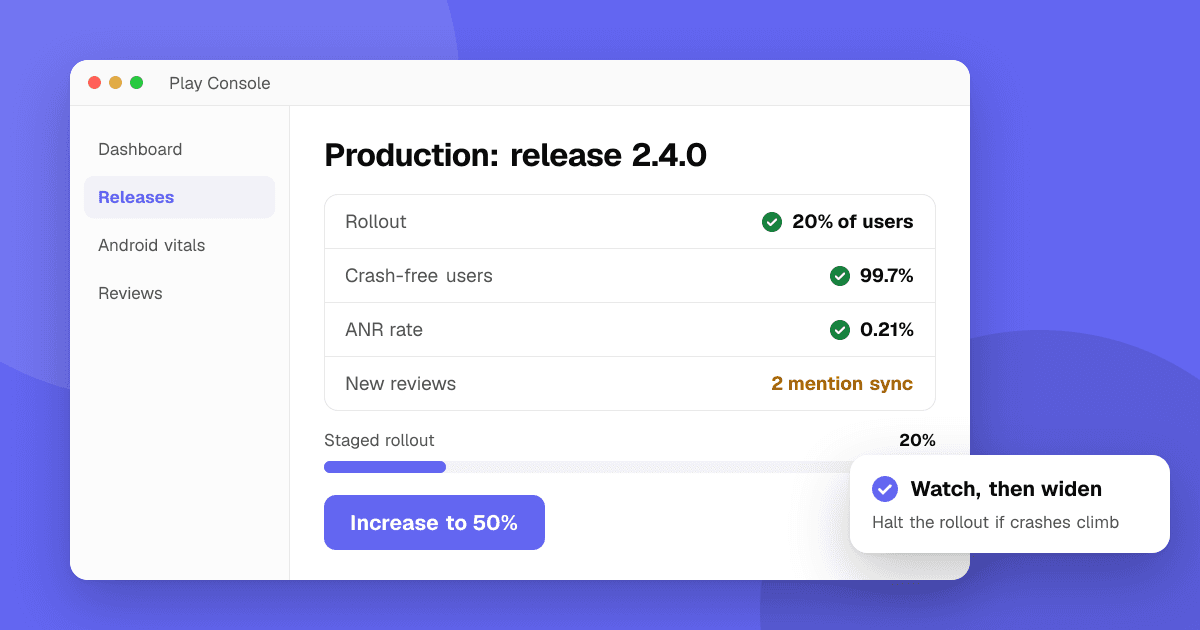
Short answer: never release a risky update to everyone at once. Use staged rollouts on Google Play and phased release on the App Store, watch crashes and reviews for a day or two, and halt or pause if something breaks. Put risky features behind remote flags so you can turn them off without a new build, keep your backend compatible with older app versions, and force an update only when an old version truly can't work.
Why can't I just roll back a bad release?
Unlike a website, a mobile release lives on people's phones. You can't replace a build that's already installed. Google Play can halt even a fully rolled-out release, so new and updating users get the previous version again (not for the first release on a track), but people who already updated keep the bad one. Either way, the real fix is a new, higher version that goes through review again. That's why limiting who gets a new version first matters so much.
How do staged rollouts work on Google Play?
- When you release to production in Play Console, choose a rollout percentage (for example 5%, then 20%, 50%, 100%).
- Only that share of eligible users gets the update automatically.
- If crashes or bad reviews spike, halt the rollout. Users who already updated keep the version; others stay on the previous one.
- Watch Android vitals and new reviews before each increase.
How does phased release work on the App Store?
- In App Store Connect, turn on phased release for automatic updates for the version.
- Apple releases it over seven days to a growing share of users with automatic updates on: 1%, 2%, 5%, 10%, 20%, 50%, then 100%.
- You can pause the phased release if something goes wrong (as often as you like, for up to 30 days in total), or release to everyone early.
- Anyone can still download the update manually from the store during the phase, so it limits exposure rather than blocking it.
What should I watch during a rollout?
- Crash-free users and ANR rate for the new version compared with the previous one (see crash reporting for indie developers).
- New reviews and support emails mentioning the update.
- Key actions: sign-ups, purchases and the main task in your app.
- Backend errors from the new version.
How do feature flags help?
A remote flag (from your own backend or a remote config service) lets you ship code turned off, then turn it on for a small group. If it misbehaves, turn it off in seconds without a new build. Keep flags few and remove them once a feature is stable.
When should I force users to update?
Forced updates frustrate people, so use them rarely:
- Good reasons: a security fix, an API that the old version can't use anymore, a legal requirement.
- Better first: a soft prompt ("A new version is available") and keeping your API backward-compatible for a few versions.
- How: on Android, Google Play's in-app updates API supports flexible and immediate update flows. On iOS, check the minimum supported version from your backend and show a screen that links to the store.
Next steps
Turn on staged rollouts or phased release for your next version, add one remote flag for the riskiest feature, and decide the oldest app version your backend will support. Before release, have real people try the build: our guide on Google Play testing tracks explains where to start.
Frequently asked questions
Can I roll back an app update on Google Play or the App Store?
Not for people who already updated. You can halt a Google Play release (even a fully rolled-out one) or pause an App Store phased release so fewer people get it, but the fix is a new build with a higher version number.
How long does App Store phased release take?
Phased release spreads an update over seven days to users with automatic updates turned on. You can pause it or release to everyone at any time.
Should I force users to update my app?
Only when an old version can't work safely, such as after a security fix or when an old API is shut down. Otherwise use a gentle update prompt and keep your backend compatible.