How to publish your first app on the App Store: a step-by-step guide
From the Apple Developer Program to App Review: every step to publish your first iOS app on the App Store, plus the mistakes that most often get apps rejected.
· 5 min de lectura
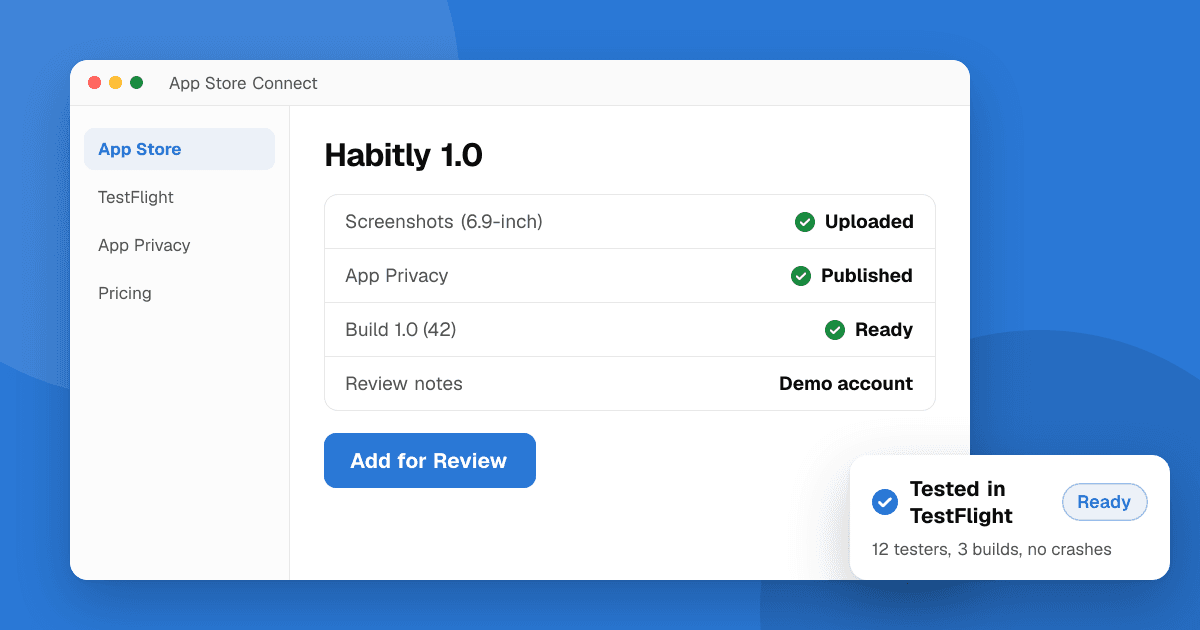
Short answer: join the Apple Developer Program ($99 per year), create your app record in App Store Connect, archive and upload a build from Xcode, test it with TestFlight, fill in the listing, screenshots and privacy details, then submit it for App Review. Most reviews finish within a day or two. The most common reasons for rejection are crashes, incomplete information (such as a missing demo login), misleading metadata and apps that do too little.
What do I need before I start?
- A Mac with a current version of Xcode. Apple requires recent Xcode and SDK versions for uploads.
- An Apple Account with two-factor authentication turned on.
- Apple Developer Program membership: $99 per year for individuals and organizations. Organizations also need a D-U-N-S number. Some nonprofits, schools and government bodies can ask for a fee waiver.
- A privacy policy URL. Every app on the App Store needs one.
- A support URL where people can contact you.
Prices and requirements can change, so confirm current details on the Apple Developer website when you enroll.
Step 1: How do I join the Apple Developer Program?
Enroll at developer.apple.com. As an individual, your own name appears as the seller. As an organization, your company name appears, which looks more professional but needs a registered legal entity and a D-U-N-S number. Enrollment for individuals is usually quick; organizations can take longer because Apple verifies the business.
Step 2: How do I set up the app in Xcode?
- Choose a bundle identifier such as com.yourname.habittracker. It must be unique and can't be changed once the app is on the store.
- Under Signing and Capabilities, select your team and let Xcode manage signing automatically. That's the simplest option for a first app.
- Add an app icon in the asset catalog. Xcode generates the sizes from a 1024 x 1024 image.
- Set the version (for example 1.0) and build number (1). Each upload needs a higher build number.
Step 3: How do I create the app in App Store Connect?
In App Store Connect, open Apps, click the plus button and choose New App. Enter:
- Platform, name (up to 30 characters and unique on the store), primary language.
- The bundle ID you registered.
- An SKU, which is just your own internal reference.
Step 4: How do I upload a build?
- In Xcode, select Any iOS Device as the destination.
- Choose Product, Archive.
- In the Organizer window, click Distribute App and choose App Store Connect.
- Wait for processing. The build appears in App Store Connect after a few minutes to an hour, and you'll get an email if something is wrong (such as a missing icon or usage description).
Frameworks such as Flutter and React Native produce an Xcode project you archive the same way, or you can use their build tools and Apple's Transporter app.
Step 5: Should I test with TestFlight first?
Yes. TestFlight lets up to 100 internal testers try the build immediately, and up to 10,000 external testers after a short Beta App Review. Builds stay available for 90 days. Testing on real devices catches crashes and layout problems on screen sizes you don't own. Read beta testing platforms for indie developers for a full comparison.
Step 6: What goes into the App Store listing?
- Subtitle (up to 30 characters): a short summary under the name.
- Description: start with the main benefit. It doesn't affect search, so write it for people.
- Keywords (up to 100 characters, comma-separated): the words people search for. Don't repeat your app name or use competitors' trademarks.
- Screenshots: Apple asks for screenshots for specific device sizes, so check App Store Connect for the current required sizes. Show the real app.
- Promotional text, support URL, marketing URL and copyright.
- Age rating: a questionnaire about content in your app.
Step 7: What are App Privacy details?
Under App Privacy, you describe what data the app collects, whether it's linked to the user, and whether it's used for tracking. This becomes the privacy "nutrition label" on your store page. Include data collected by SDKs like analytics, crash reporting and ads. If the app tracks users across other companies' apps or websites, you also need to use the App Tracking Transparency prompt.
Step 8: How do I submit for App Review?
- Select your build on the version page.
- Fill in App Review Information: contact details and, if your app needs a login, a working demo account. Missing demo access is one of the most common reasons for rejection.
- Add notes about anything a reviewer might not understand, such as hardware it needs or features that only appear in certain regions.
- Choose manual or automatic release after approval.
- Click Add for Review, then Submit.
Apple says most submissions are reviewed within 24 to 48 hours. If your app is rejected, you'll get a message in App Store Connect that cites a guideline. Fix the issue or reply with an explanation in the Resolution Center.
Why do first apps get rejected?
- Crashes and bugs during review (Guideline 2.1, App Completeness).
- Missing information, such as no demo account or placeholder text.
- Inaccurate metadata: screenshots or descriptions that don't match the app.
- Minimum functionality: apps that are a thin website wrapper or do very little.
- Privacy issues: missing privacy policy, missing permission explanations, or data collection that doesn't match your privacy details.
- Asking for ratings in exchange for rewards. Apple doesn't allow incentivized reviews; use the system rating prompt (SKStoreReviewController) without conditions.
Our guide to common App Store and Google Play rejections covers these in more detail.
Next steps
Enroll in the developer program, get a TestFlight build to a few real people, and fix what they find before you submit. Then list your app on TrueLaunch so people outside your circle can try it and leave honest, structured feedback.
Frequently asked questions
How much does it cost to publish on the App Store?
The Apple Developer Program costs $99 per year for individuals and organizations, with fee waivers available for some nonprofits, schools and government organizations. Confirm the current price on Apple's developer site.
Do I need a Mac to publish an iOS app?
Building and uploading normally requires Xcode, which runs on macOS. Some cloud build services can build and upload for you, but you still need an Apple Developer account.
How long does App Review take?
Apple says most submissions are reviewed within 24 to 48 hours. It can take longer around holidays or if the reviewer needs more information from you.
Can I ask users to rate my app?
Yes, with Apple's built-in rating prompt, shown at a natural moment. You can't offer rewards for ratings or ask for a specific star rating; incentivized reviews break the App Review Guidelines.