How to write a helpful app or game review
For players and users: how to write an honest app or game review that developers can act on, with what worked, what could be better and clear bug reports.
· 5 मिनट में पढ़ें
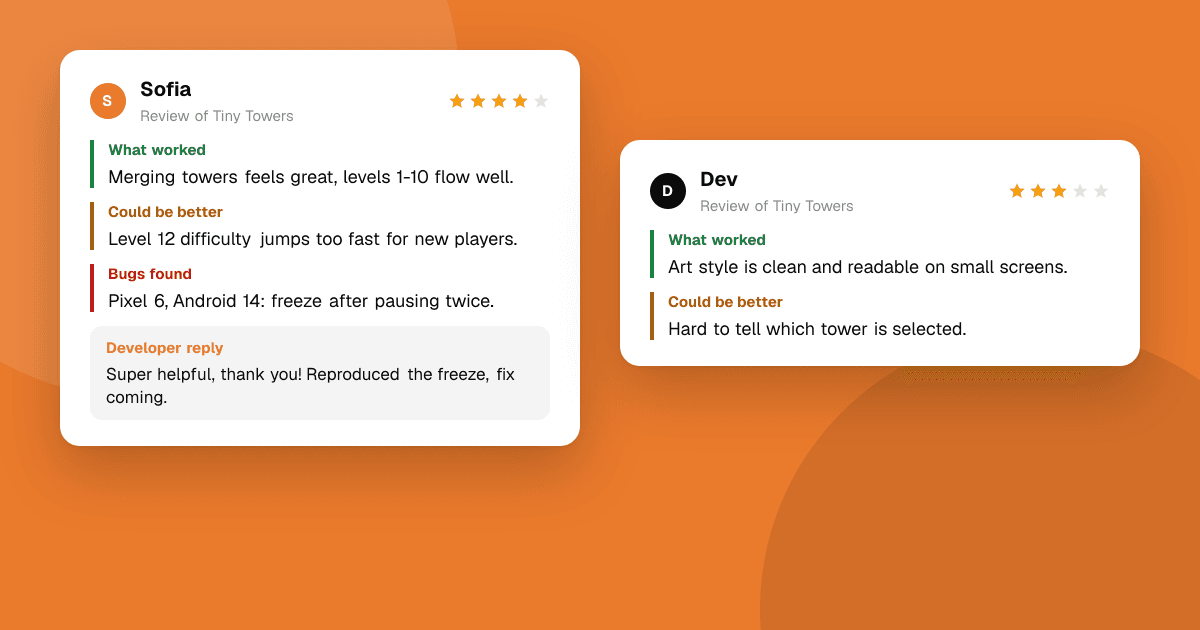
Short answer: a helpful review is honest and specific. Say what worked, what could be better and which bugs you hit, with the steps that caused them and the device you used. Describe what happened rather than only how you felt, and base it on actually using the app. Skip one-word reviews, never trade ratings, and remember that a real developer, often one person, will read every word.
Why do specific reviews matter so much?
"Great app!" and "Trash, uninstalled" feel like feedback, but a developer can't do anything with them. Compare:
- "Doesn't work." → The developer has no idea what to fix.
- "The app freezes when I add a photo larger than about 10 MB on my Galaxy A14 (Android 14)." → The developer can reproduce it today and ship a fix this week.
Specific reviews also help other people decide if the app is right for them. "Great for daily habits, but there's no way to track something weekly" tells the next reader exactly what they're getting.
What should a good review include?
Use three parts. On TrueLaunch, every review asks for exactly these.
1. What worked
Start with what you genuinely liked. It tells the developer what not to break and tells readers what the app is good at.
- "The first level teaches the controls without a single text box."
- "Setting up a reminder took under a minute."
2. What could be better
Explain what slowed you down, confused you or was missing, and why it mattered to you.
- "I couldn't find how to change the currency. I expected it in Settings, but it's under Profile."
- "The difficulty jumps a lot at level 6; I went from never failing to failing ten times in a row."
3. Bugs you found
Write bugs so someone else can repeat them:
- What you did, step by step.
- What you expected to happen.
- What actually happened.
- Your device and OS version, for example "iPhone 13, iOS 18" or "Pixel 6a, Android 15".
- How often it happens: every time, sometimes, once.
Example: "Open a saved list → tap Share → choose WhatsApp. Expected: the list is shared as text. Actual: the app closes. Happens every time. Pixel 6a, Android 15."
How do I stay honest and fair?
- Review what you actually used. Spend real time with the app before reviewing, and say if you only tried part of it ("I've only played the first world so far").
- Rate the app, not the genre. If you dislike puzzle games, a puzzle game isn't bad because of that.
- Separate bugs from preferences. "It crashes" and "I prefer a different art style" are both valid, but they're different things.
- Be kind to the person, honest about the product. Harsh truths are useful; insults are not.
- Disclose connections. If you know the developer or got the app for free, say so.
What should I never do?
- Never trade ratings (rating someone's app on the promise that they will rate yours). Rating swaps make ratings meaningless and are against the rules on TrueLaunch.
- Never accept anything in exchange for a store rating. Google Play and the App Store forbid incentivized ratings, and they can remove them.
- Never review an app you haven't used, or post multiple reviews from different accounts.
- Never include personal information, yours or anyone else's.
TrueLaunch's review guidelines explain the full rules that keep reviews fair.
How long should a review be?
Long enough to be useful, short enough to read. Two or three sentences for each part is plenty. A focused review with one clear bug report helps more than a long story with no details.
Should I update my review later?
Yes, if things change. If the developer fixes the bug you reported, say so. If a new update breaks something, add that too. Updated reviews keep the information accurate for everyone reading after you.
How do developers use my review?
Good developers read every review and look for patterns. When several people describe the same problem, it moves to the top of the list. On TrueLaunch, developers can reply to your review and mark the most useful ones, so a clear, specific review is more likely to be seen and acted on.
A complete example
What worked: The timer and the sounds are lovely, and starting a focus session takes one tap. I've used it every day for a week.
What could be better: I'd like to see a weekly summary. Right now I can only see today, so I don't know if I'm improving.
Bugs: When I lock the phone during a session and unlock it after 25 minutes, the timer still shows 3 minutes left and the alarm doesn't ring. Happens every time. iPhone 12, iOS 18.
It's honest, specific and easy to act on, and it took about three minutes to write.
Next steps
Find a new app or game you'd like to try on the launches board, use it properly, and write a review with the three parts above. If you're a developer, share this guide with your testers, and read how to get honest feedback on your app for the other side of the conversation.
Frequently asked questions
What makes an app review helpful?
Specific details: what worked, what could be better and any bugs, with the steps that caused them and your device and OS version. Developers can act on details; they can't act on 'bad app'.
Is it okay to rate an app in exchange for a rating on mine?
No. Rating swaps make ratings meaningless. They are against the rules on TrueLaunch, and incentivized ratings break Google Play and App Store policies.
How do I report a bug in a review?
List the steps you took, what you expected, what actually happened, how often it happens and your device and OS version, for example 'Pixel 6a, Android 15'.