How to write a game design document for a small indie game
A short, living game design document keeps a small team focused. Here is what to put in it, what to leave out, and a simple template you can copy today.
· 5 min read
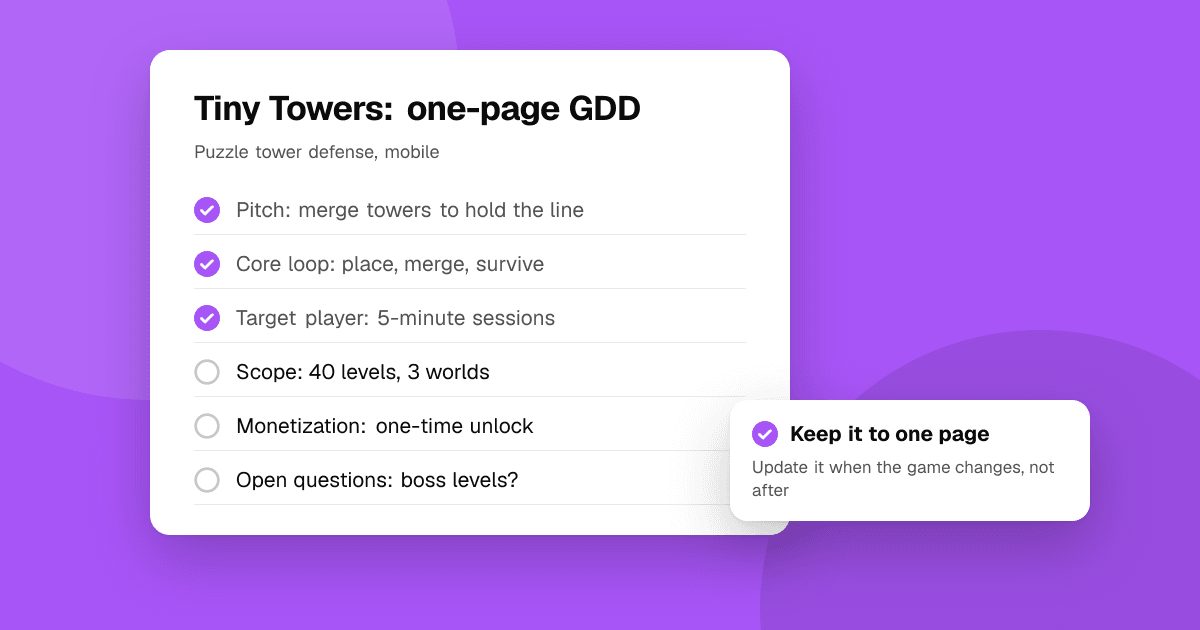
Short answer: for an indie game, a game design document (GDD) should be short and alive, not a 60-page bible nobody reads. Start with one page: the core idea, the core loop, the target player, the platforms and what is out of scope. Add sections only when the team actually needs them, keep everything in one shared place, and update it every time a playtest changes your mind.
Why write a design document at all?
Even a solo developer forgets why decisions were made. A small team disagrees about what "done" means. A GDD solves both:
- It keeps scope honest. Writing down what the game is also forces you to write down what it is not.
- It speeds up decisions. When a question comes up ("should we add crafting?"), you check it against the pillars instead of debating from scratch.
- It helps new people. An artist, composer or tester can understand the game in ten minutes.
- It records what playtests taught you. That history stops you from re-trying ideas that already failed.
What goes on the one-page version?
Start here. If you can't fill this page, you aren't ready for a longer document.
- One-sentence pitch. "A cozy puzzle game where you untangle a city's train lines." If it takes a paragraph, the idea isn't clear yet.
- Design pillars. Three or four short phrases that every feature must support, like "short sessions", "no fail state", "satisfying sounds". Features that don't serve a pillar get cut.
- Core loop. What the player does every 30 seconds, every 5 minutes and every day. For example: solve a puzzle, earn a new track piece, unlock the next district, come back tomorrow for the daily map.
- Target player. Who it's for and where they play: "commuters who play one-handed for five minutes".
- Platforms and controls. Phone only? Portrait or landscape? Touch, tilt, controller?
- Monetization model. Premium, free with ads, in-app purchases or a mix. This shapes design early, so decide it on day one.
- Out of scope. The list of things you will not build for version 1.0. This is the most useful line in the document.
What sections can I add later?
Only add a section when someone needs it to do their work:
- Mechanics. Each mechanic in a short block: what it does, how the player learns it, how it interacts with others. Use numbers where they matter (jump height, cooldowns) and keep them in a separate tuning sheet if they change often.
- Progression. How the game gets harder or deeper over time, and what the player unlocks. A simple table of levels or chapters works well.
- Content list. Levels, enemies, items, characters, with a status column (idea, in progress, done).
- User interface. Rough sketches of each screen and the flow between them. Photos of paper sketches are fine.
- Art and audio direction. A few reference images, a color palette and the mood you want. Link to a mood board instead of describing it in words.
- Onboarding. How the first five minutes teach the game. See our guide to mobile game onboarding.
- Technical notes. Engine, target devices, save system, online features and any limits that affect design.
How do I keep it from becoming useless?
Most design documents die because they go out of date. To keep yours alive:
- Keep it in one shared, editable place (a shared doc, a wiki or a notes app), not in a file people email around.
- Write short. Bullet points, tables and sketches beat paragraphs. If a section is longer than a screen, split it.
- Date your decisions. "Removed lives system (12 March): playtesters quit after the first fail." That one line saves hours later.
- Review it after every playtest. Update what changed, and move cut ideas to a "parking lot" section instead of deleting them.
- Link, don't copy. Point to the tuning sheet, the task board and the art folder instead of pasting their contents.
What does a simple template look like?
Copy these headings into a new document:
- Pitch (one sentence)
- Pillars (three or four)
- Core loop (30 seconds, 5 minutes, daily)
- Target player and platforms
- Monetization
- Out of scope for 1.0
- Mechanics
- Progression and content list
- Screens and flow
- Art and audio direction
- Onboarding plan
- Open questions
- Decision log
- Parking lot
Fill in the first six today. Leave the rest as headings until you need them.
What mistakes should I avoid?
- Designing everything before prototyping. Write the one page, build a rough prototype and let playtests fill in the rest.
- Describing feelings instead of rules. "Combat feels punchy" is a goal; "hits pause the game for 60 milliseconds and shake the camera" is a design.
- No out-of-scope list. Without it, every good idea becomes a feature and the game never ships.
- Writing for yourself only. If a new teammate can't understand the pitch and core loop in ten minutes, simplify.
Next steps
Write your one-page GDD today and share it with one person who will tell you what's unclear. Then prototype the core loop and test it with strangers: our guide on finding playtesters for your indie game explains how. When the game is playable, list it on TrueLaunch to collect structured reviews on what worked, what could be better and which bugs players hit.
Frequently asked questions
How long should a game design document be?
For a small indie game, start with one page: pitch, pillars, core loop, target player, platforms, monetization and out of scope. Add sections only when someone on the team needs them.
Do solo developers need a game design document?
A short one helps. It keeps scope under control, records why you made decisions and makes it easier to bring in an artist, composer or testers later.
Where should I keep my GDD?
In one shared, editable place such as a shared document or wiki, so there is always a single current version. Link to tuning sheets and task boards instead of copying them in.