iOS 27 scam protection: what app developers need to know
How iOS 27's Impersonation Risk Detection and Trust Insights framework work, which actions to check, and how your app should respond to medium and high risk.
· 6 min read
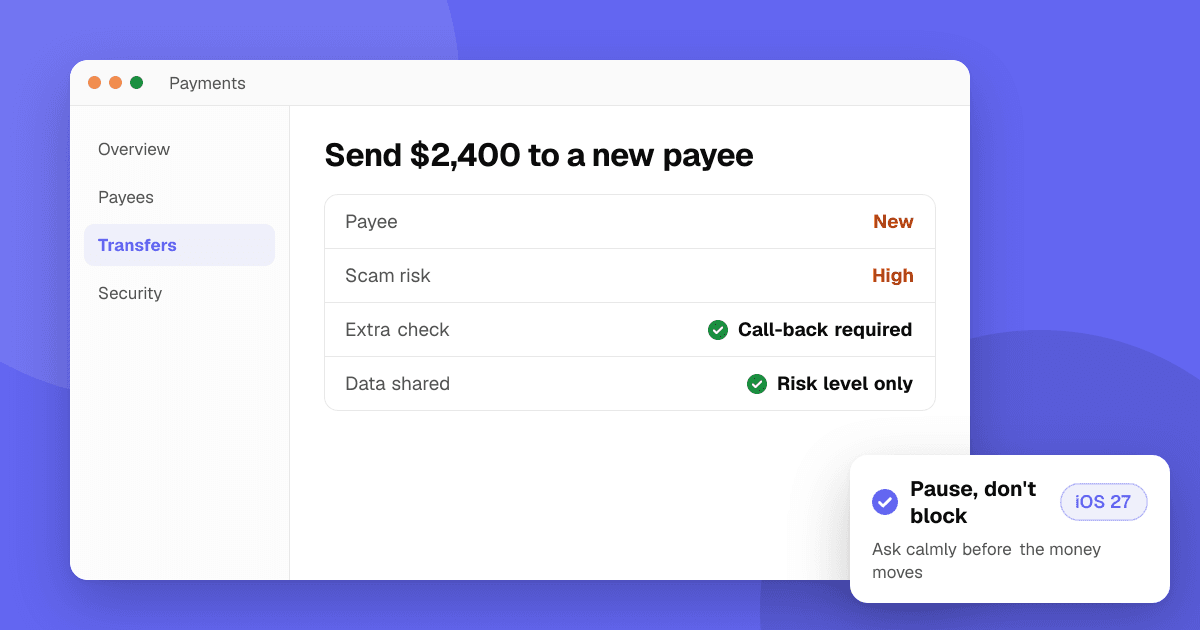
Short answer: iOS 27 adds Impersonation Risk Detection, a setting that lets supported apps ask the iPhone whether someone may be coaching the user through a scam right now. Developers adopt it with Apple's new Trust Insights framework. Before a risky action, such as a payment or a password change, your app requests an evaluation and gets back one risk level: unknown, medium or high. The analysis runs on the device, your app never sees the underlying data, and you decide what to do with the result: usually extra confirmation, a warning or a short delay, never a silent block.
What is iOS 27 Impersonation Risk Detection?
It is a user-facing privacy setting aimed at active social engineering scams: someone pretending to be a bank, a government agency or a family member, pressuring a person to send money or change account details. Two-factor authentication can't stop these scams, because the real account owner is the one tapping the buttons.
According to Apple's support page:
- It is available from iOS 27 and iPadOS 27, and only works in apps that support it.
- People turn it on in Settings > Privacy & Security > Impersonation Risk Detection by enabling Share with App Developers. They may need to be signed in to the App Store.
- Changes to the setting can take up to 24 hours to take effect.
- Apple analyzes "interaction patterns, timing, context, and basic sensor data" on the device and never analyzes the content of Photos, Messages or Mail.
- The app receives only the risk level, not the information behind it. Apple learns the type of action attempted, not the data used to judge it.
Apple's page also warns users that if someone tells them to turn the feature off, they may be the victim of a scam.
How does the Trust Insights framework work?
The developer side is the Trust Insights framework (iOS, iPadOS and Mac Catalyst 27). Per Apple's documentation and the WWDC26 session Meet Trust Insights:
- Add the Trust Insights capability to your app target. Apple's documentation names the entitlement
com.apple.developer.trustinsights.base. - Describe the action with an operation category:
payment,account,resourceUse,communicationorother. - Request the one insight the framework currently supports,
IsLikelyBeingCoachedInsight, through anInsightEvaluator. - Check authorization first. The person must allow your app to request evaluations.
- Read the outcome (
unknown,mediumorhigh) and act on it. - Report what you did by calling
reportConsumptionon every evaluation.
A simplified version of Apple's example:
import TrustInsights

let request = IsLikelyBeingCoachedInsight.request(schema: .version1)
let context = InsightEvaluator.InsightContext(operationCategory: .payment,
                                              requestedEvaluations: request)
let evaluator = InsightEvaluator()
guard try await evaluator.requestAuthorization(for: context) == .authorized else { return }

let evaluation = try await evaluator.requestEvaluation(context: context)
switch try evaluation.insight.outcome.get() {
case .medium, .high:
    evaluation.reportConsumption(.usedIncreasedFriction)
    // Show a warning, ask for confirmation or add a delay
default:
    evaluation.reportConsumption(.usedUnchangedFriction)
}
Check Apple's documentation for the current signatures before you ship, since the API is new.
What do unknown, medium and high mean?
- Unknown: no signs of suspicious activity were found. Apple is explicit that this does not mean the action is safe, so never treat it as "low risk" or skip checks you already run.
- Medium: some signs of coaching were detected. Apple suggests added friction, extra verification or adjusting your own risk score.
- High: significant signs were detected. Apple says to tell the person about the risk before they continue.
Which actions should my app check?
Pick high-value, hard-to-undo moments, not every tap. The WWDC session suggests:
- Payments, especially peer-to-peer transfers, large purchases and changes to payout details.
- Account security changes: password, email or phone number changes, and turning off two-factor authentication.
- Irreversible actions, such as deleting an account or exporting personal data.
- Permission grants, such as authorizing a new device or allowing remote access.
- Sensitive sharing, such as sending credentials or personal documents.
An evaluation is asynchronous, can take a couple of seconds and needs a network connection, so start it early or run it during an existing loading step.
How should my app respond to a medium or high risk?
The goal is to give the person a moment to think, not to accuse or block them.
- Add friction, not walls. Ask them to confirm, re-enter a code or wait a short cooling-off period before the payment goes through. Apple says blocking an action based only on an insight is not recommended.
- Use calm, plain words. For example: "Before you send this, a reminder: banks and government agencies never ask you to move money to keep it safe. Do you know this person?" Avoid wording that suggests the person did something wrong.
- Never block silently. If you pause or decline something, say so and explain how to continue or get help.
- Offer an exit. A clear "Cancel payment" button is often the most useful thing on the screen.
- Combine it with your own checks. Treat the insight as one input to your existing fraud logic, never the only factor.
What are the reporting and privacy rules?
- Consumption reporting is required. Call
reportConsumptionon every result with what you did, such asusedIncreasedFrictionornotUsedNotNeeded. Apple says apps that skip this may be rate-limited. - Fraud labels are optional. If a transaction is later confirmed as fraud, Apple encourages a server-to-server report through Apple Business Register, without personal data.
- Don't build profiles from it. Use the risk level for the action at hand. Don't store it as a long-term trait of the user, combine it with tracking, or share it with third parties.
- Update your disclosures. If you keep the result on your servers, describe it in your privacy policy and App Store privacy details.
Does this replace my existing fraud checks?
No. It adds a signal that authentication can't provide, because it looks at whether the person may be under pressure, not whether they are who they say they are. Keep your current checks, such as App Attest for verifying requests come from your real app, server-side limits and manual review for large amounts.
Next steps
List the two or three actions in your app where a scam would hurt users most, design a calm confirmation screen for medium and high results, and test it with the sandbox values Xcode lets you override. Before releasing, read how to ship app updates safely and update your privacy policy and App Store privacy labels. Then list your app on TrueLaunch for free to hear from real people how the new flow feels.
Frequently asked questions
How do I turn on scam protection in iOS 27?
Open Settings, tap Privacy & Security, then Impersonation Risk Detection, and turn on Share with App Developers. It only works in apps that support it, and changes can take up to 24 hours.
What does my app receive from Impersonation Risk Detection?
Only a risk level for the action: unknown, medium or high. The analysis happens on the device, and neither your app nor Apple receives the data used to generate it.
Does an unknown result mean the action is safe?
No. Apple says unknown means no signs of suspicious activity were found, not that the action was confirmed as safe. Keep your usual checks in place.
Should my app block a payment when the risk is high?
Apple recommends against blocking based only on the insight. Warn the person clearly, ask them to confirm or add a delay, and combine the result with your own fraud checks.