How to research App Store and Google Play keywords on a budget
Find the words people really search for, pick ones you can rank for, and place them in your title, subtitle, keyword field and description without stuffing.
· 3 min read
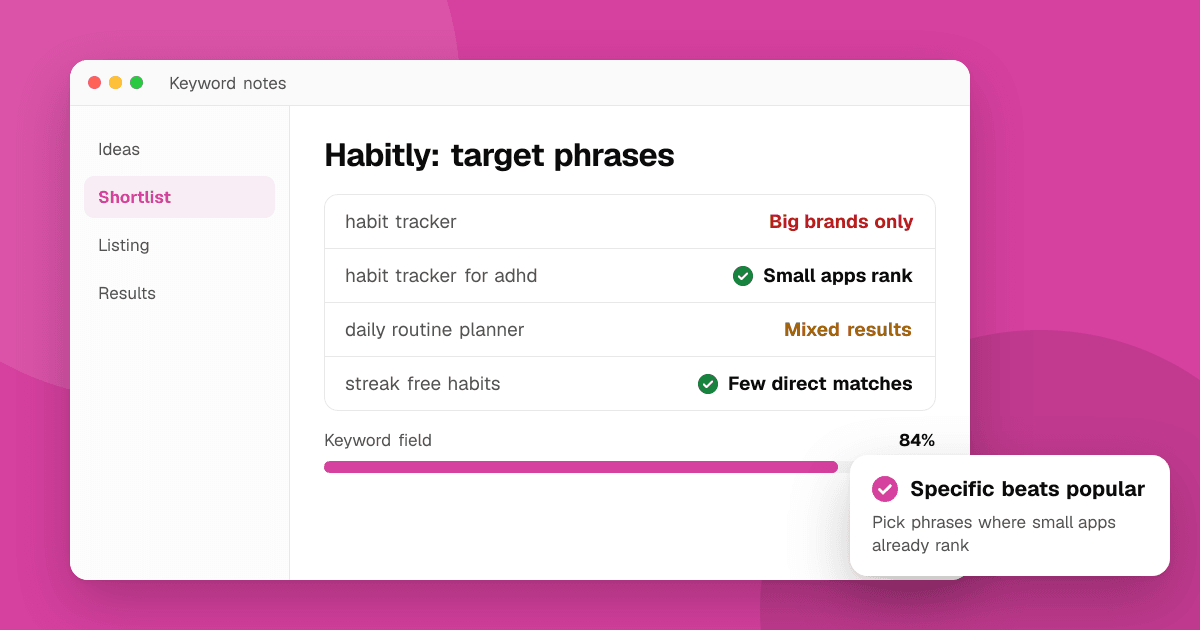
Short answer: collect the words real users use to describe the problem your app solves, check what the store's search suggestions show for each, look at which apps already rank, and pick specific phrases where small apps appear in the results. Put the most important phrase in your title, the next ones in the subtitle or short description, and the rest in the App Store keyword field or naturally in your Google Play description. Recheck every few weeks.
Where do keywords go on each store?
App Store:
- App name (30 characters) and subtitle (30 characters) carry the most weight.
- Keyword field (100 characters, hidden): separate words with commas, no spaces needed, and don't repeat words already in your name or subtitle.
Google Play:
- Title (30 characters) and short description (80 characters) matter most.
- There's no keyword field. Google reads your full description (up to 4,000 characters), so use important phrases naturally a few times.
How do I find keyword ideas for free?
- Ask users how they'd describe your app to a friend. Reviews and support emails are full of real phrases.
- Use store search suggestions. Type the start of a phrase in each store and note the suggestions; they come from what people search.
- Read competitors' titles and subtitles for the apps that rank for your main idea.
- Think in problems, not features: "split bills with friends" rather than "expense ledger".
Paid ASO tools add search-volume estimates, but you can make good choices without them when you're starting.
How do I pick keywords I can actually rank for?
For each phrase, search it in the store and look at the first ten results:
- All giant brands? Too hard for now.
- A mix of small apps and older apps with few updates? A good target.
- Results don't match the phrase well? An opportunity; few apps target it directly.
Longer, specific phrases ("habit tracker for ADHD") bring fewer searches but much better matches than single words ("habits").
How do I write keywords into my listing?
- Write for people first. "Habitly: Habit Tracker" reads well; "Habit Tracker Daily Goals Routine Planner" doesn't, and the stores may reject it.
- Don't use competitor brand names or claims like "#1" or "best"; both stores restrict them.
- On the App Store, ASO practitioners generally find singular forms are enough and that words like "app" and your category name add little.
- Localize keywords, don't just translate them. People in each market search with their own phrases. See app localization for indie developers.
How do I know if it worked?
- In App Store Connect, check App Store search impressions and downloads from search.
- In Play Console, check store listing acquisition by traffic source and search terms.
- Change keywords in one release, then wait a few weeks before judging. Rankings move slowly.
Next steps
Write down 20 phrases from users and store suggestions, check the top results for each, and pick five you can win. Update your title, subtitle and keyword field, then read our full App Store optimization guide. A listing on TrueLaunch also gives your app a crawlable page outside the stores: submit it for free.
Frequently asked questions
Does Google Play have a keyword field?
No. Google Play reads your title, short description and full description. Use your most important phrases naturally in those fields instead of listing keywords.
Should I repeat keywords in the App Store keyword field?
Generally no. ASO practitioners find that words in your app name or subtitle already count for search, so repeating them in the 100-character keyword field wastes space.
How long do keyword changes take to show results?
Usually a few weeks. Rankings depend on downloads and other signals too, so change one set of keywords at a time and compare search traffic before and after.