Why is my app not showing in Play Store or App Store search?
Your app is live but nobody can find it in search. The common causes, from indexing delays to country settings and title mismatches, and how to fix each one.
· 6 menit baca
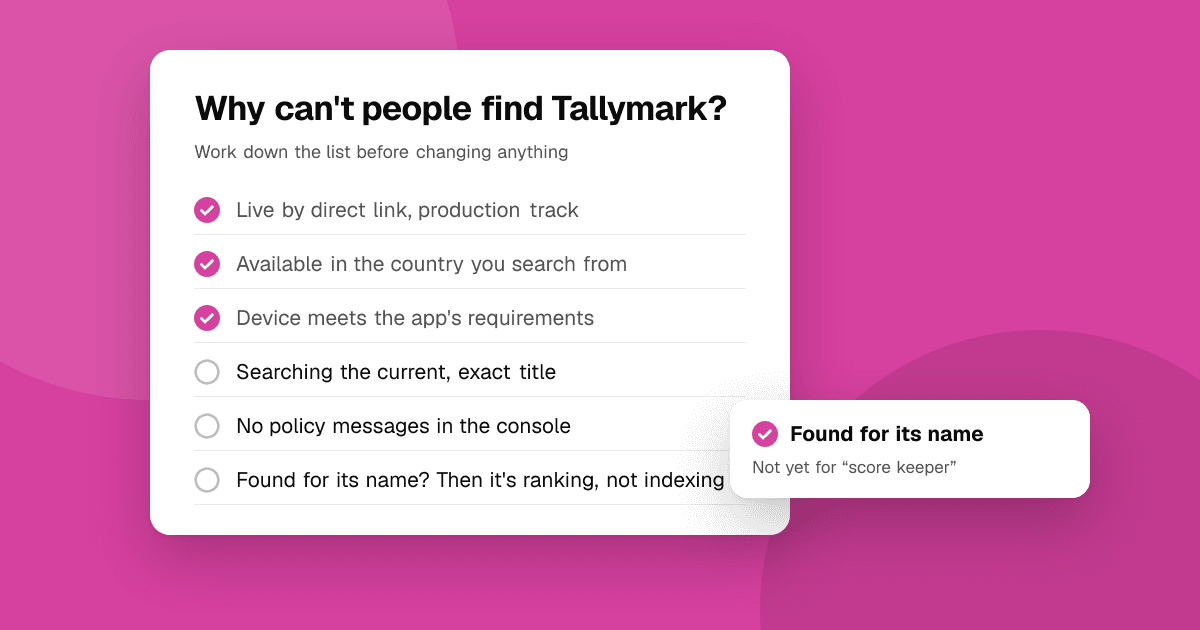
Short answer: most "my app doesn't show up" problems come from a handful of causes: the app went live recently and the store hasn't indexed it for search yet, it isn't available in the country or on the device you're searching from, the name you're searching doesn't match the listing closely enough, or a policy or age-rating setting limits where it appears. Check your own app name with an unpersonalized app rank checker first, then work through the list below.
First: is it really missing, or just low?
"Not showing" means two different things, and the fixes are different:
- Missing: the app doesn't appear even when you search its exact name.
- Low: the app appears for its name but not for the general keywords you hoped for, such as "expense tracker".
Run your exact app name, and then one or two target keywords, through the app rank checker. It searches the store signed out, in the country you pick, which removes your own phone's personalization from the picture.
- Found for its name, not for keywords? Your app is indexed; this is a ranking problem. Skip to "Why does my app show for its name but not my keywords?"
- Not found even for its name? Keep reading.
Has the app only just been published?
New listings aren't always searchable the moment they go live. Both stores need time to process and index a new app, and timing varies. In practice, developers often find that a direct link works before search does.
What to do:
- Open the listing by direct link to confirm it's live (your Play Console or App Store Connect shows the link).
- Wait a few days before assuming something is wrong, and check again.
- Make sure the release is actually public. On Google Play, an app that's only in internal, closed or open testing isn't in normal search; see Google Play's testing tracks explained. On the App Store, a build in TestFlight isn't on the store.
Is the app available in the country you're searching from?
Search only shows apps available in that storefront.
- Google Play: check the countries and regions selected for your production release in Play Console.
- App Store: check Pricing and Availability in App Store Connect.
Remember that your phone searches your own country's store. If you're in India and your app is only released in the United States, you won't find it. The rank checker lets you pick the country explicitly, which makes this easy to test.
Is the app compatible with the device you're searching on?
Stores often hide apps from devices that can't run them:
- Google Play filters by Android version, screen, hardware features (such as a camera or telephony) and declared device types. If your manifest requires a feature your test phone lacks, the app may not appear in search on that phone.
- App Store results differ between iPhone and iPad, and iPad-only or iPhone-only apps can be hidden on the other device.
Search from a device that clearly meets your requirements, and review your declared requirements and supported devices.
Does the name you're searching match the listing?
Search engines match text. If you type something different from what's in your listing, you may not find it:
- You're searching an old name. If you renamed the app, search the new title.
- Different spelling. "Habitly" vs "Habbitly", or a brand name with an unusual spelling or spacing.
- Very generic names. An app named "Notes" or "Timer" will be buried among thousands of results, even for its own name. See how to choose an app name.
- Language. If your listing is only in English but you search in another language's storefront, matching can be weaker.
If your exact name doesn't find you because it's a common word, add a distinctive brand plus a descriptive phrase, like "Pennywise: Budget Planner".
Could a policy or age-rating setting be limiting the app?
Less common, but worth checking when nothing else explains it:
- Policy issues. On Google Play, apps with policy problems can have limited visibility or be removed. Check Play Console for policy messages and your inbox for emails from the store.
- Content and age ratings. Apps rated for adults may be hidden from accounts with restrictions or parental controls.
- Family settings. Searching from a supervised or child account can hide apps that would show for an adult account.
Why does my app show for its name but not my keywords?
That's normal for a new app, and it's an ASO problem rather than a bug. Stores rank apps for a keyword using how relevant your listing text is and, as ASO practitioners generally observe, how people respond when they see your app for that search. A brand-new app with little history rarely ranks for broad phrases.
What helps:
- Put your main phrase in your title, and supporting phrases in the iOS subtitle and keyword field, or the Google Play short and full description.
- Target specific phrases first. "Budget planner for couples" is easier than "budget". Check phrases with the keyword difficulty checker and read long-tail keywords for apps.
- Find phrases people actually type with keyword suggestions.
- Check your listing text with the free ASO audit checklist.
Read how Google Play search ranking works and how App Store search ranking works for the bigger picture.
Is it a temporary store problem?
Occasionally search behaves oddly for everyone: results lag behind listing changes, or a store is rolling out a change to search. Signs that it's not you:
- Your direct link works and your console shows no warnings.
- Other apps you know are also missing or out of place.
- The problem is in one store and not the other.
In that case, note the date, keep checking daily for a few days, and avoid making several listing changes at once. If you change everything while the store is unsettled, you won't know what actually fixed it.
A quick troubleshooting checklist
- Open the listing by direct link: is it live and public?
- Run your exact app name through the app rank checker for the right store and country.
- Confirm country availability in your console.
- Search from a device that meets your app's requirements.
- Search the current, exact title.
- Check for policy messages or age-rating limits.
- If it's found for its name but not keywords, work on your listing text and target specific phrases.
Next steps
Run the checklist above, and once your app shows for its own name, start checking your keyword rankings and tracking them weekly. If people find your app but don't install it, read why is nobody downloading my app. All our free ASO tools are on the tools page.
Frequently asked questions
Why can't I find my new app in Play Store search?
New apps can take time to be indexed for search, so a direct link often works first. Also check that the release is public (not only a testing track), that it's available in your country, and that your device meets its requirements.
Why doesn't my app appear in App Store search?
Check that it's released (not only in TestFlight), available in your storefront under Pricing and Availability, and compatible with the device you're searching on. If it's live and recent, wait a few days and search the exact current name.
My app shows for its name but not for keywords. Is something wrong?
Usually not. Ranking for general keywords takes relevant listing text and time. Put your main phrase in the title, target specific long-tail phrases first, and track your positions weekly.
How can I check if my app shows in search in another country?
Use a rank checker that lets you choose the country. TrueLaunch's free app rank checker searches Google Play or the App Store signed out, in the storefront you pick, and shows whether and where your app appears.