Why is nobody downloading my app? 7 reasons and how to fix each one
Your app is live but installs are flat. Seven common reasons apps get no downloads, how to tell which one is yours, and what to fix first, in order.
· 5 min read
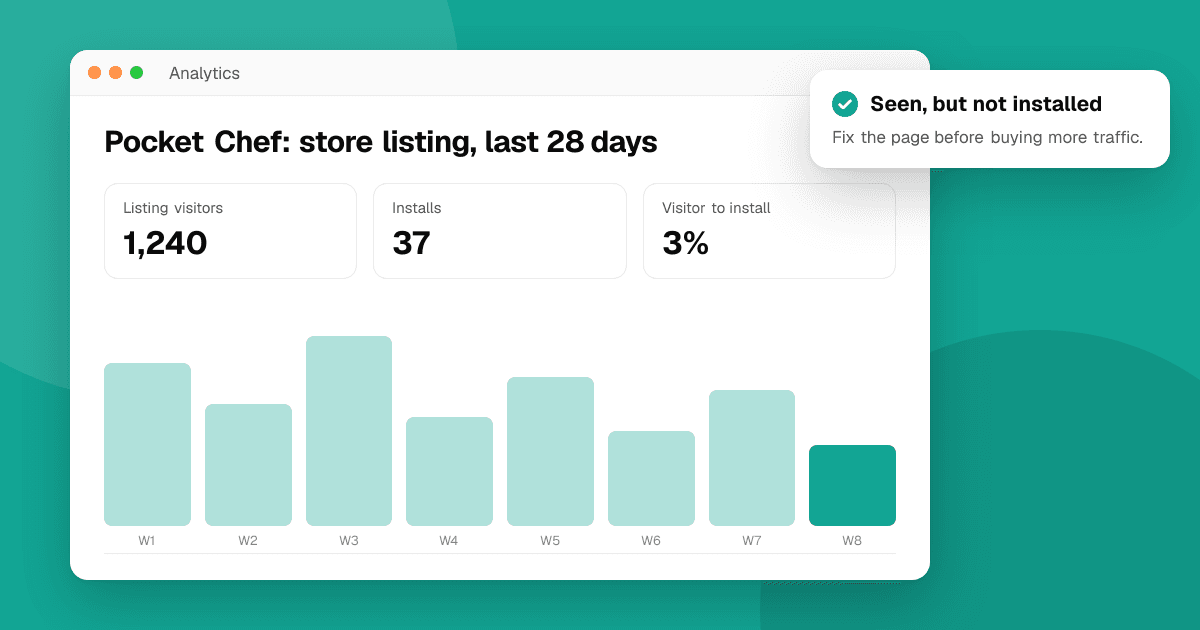
Short answer: almost every app with no downloads has one of two problems. Either nobody sees it (the store doesn't show it and you haven't sent anyone to it), or people see it and don't install (the icon, screenshots, first line or rating don't convince them). Check which one it is first, using your store console numbers, then fix that problem before anything else. Posting the link in more places won't help if the page itself doesn't convert, and a better page won't help if nobody visits it.
Is it a visibility problem or a conversion problem?
Open your store console and look at the last 28 days:
- Google Play Console: Statistics and the store listing acquisition report show store listing visitors and how many of them installed.
- App Store Connect: App Analytics shows impressions, product page views and first-time downloads.
Then read the numbers like this:
| What you see | What it means | Where to start |
|---|---|---|
| Very few visitors or impressions | Nobody finds the page | Reasons 1–3 |
| Plenty of visitors, very few installs | The page doesn't convince | Reasons 4–6 |
| Installs come, then stop | Early users leave or rate it low | Reason 7 |
There's no universal "good" conversion rate, because it varies a lot by category and country. Compare your own page against itself: change one thing, wait a week or two, and see whether the share of visitors who install goes up.
1. Nobody searches for the words in your listing
The store can only show your app for words it knows the app is about. If your title and description use your own brand language ("Zenflow") instead of the words people type ("habit tracker"), you're invisible in search.
Fix: put the main thing your app does in the title or subtitle, and write the first lines of the description around the real search phrases. Our guide on researching app store keywords shows how to find them.
2. You launched once and stopped
A store page gets a small burst of attention on launch and then goes quiet. Most indie apps that "failed" were promoted for one weekend.
Fix: plan at least a month of small, steady promotion: one community post, one short video, one update note each week. See how to promote your app for free and where to launch your app for places that welcome new apps.
3. You posted, but in the wrong way
Dropping a link in ten communities usually earns silence or a ban. People ignore ads from strangers and reply to people who help them.
Fix: share the story behind the app, what you learned building it, and ask a specific question. Use each community's self-promotion thread. Our guide on promoting on Reddit without getting banned covers the rules most communities share.
4. The icon and first screenshots don't explain the app
On a search results page, people decide in a second or two, from the icon and the first two or three screenshots. A screenshot of a settings screen or a login form tells them nothing.
Fix: make the first screenshot show the main benefit, with a short caption ("Plan a week of meals in 2 minutes"). See app screenshots and icons that convert.
5. The first line of the description is wasted
Most visitors never tap "read more". If your first line is "Welcome to our app!", you've spent your best space on nothing.
Fix: use the first line to say who the app is for and what it does better. Our guide on writing an app description that converts has examples.
6. A low rating or a few harsh reviews scare people off
A handful of early one-star reviews about a crash can sit at the top of your page for weeks. Visitors read them and leave.
Fix: treat it as a product problem, not a marketing problem. Fix the issue the reviews describe, reply to each review, and ship the update. Our guide on recovering from a low app rating walks through it step by step. Never buy reviews or trade them: it gets apps removed.
7. People install and leave straight away
If installs arrive but uninstalls and bad reviews follow, the first minute of the app is losing them: a long sign-up, a confusing first screen or a crash on some devices.
Fix: watch two or three people use the app for the first time without helping them, and check your crash reports. See app onboarding best practices and crash reporting for indie developers.
What should I fix first?
Work from the bottom of the funnel up:
- Crashes and broken first steps (reason 7). Sending people to an app that breaks only creates more bad reviews.
- The store page (reasons 4–6). Every visitor you get afterwards converts better.
- Visibility (reasons 1–3). Now promotion pays off, because the page and the app hold up.
How do I find out what's wrong before more users do?
You're too close to your own app to see what confuses a stranger. Ask a few people outside your circle to try it and tell you, specifically, what worked, what could be better and what broke. List your app on TrueLaunch to get that kind of structured, honest feedback from other makers and players, and read how to get honest feedback on your app for other ways to collect it.
Frequently asked questions
How long does it take for a new app to get downloads?
There's no fixed time. Most new apps get very few organic installs at first, because stores have little data about them. Steady promotion, a clear store page and a stable app are what get the first installs moving.
Does the app store hide new apps?
Stores don't hide new apps, but they rank apps partly on how people respond to them, so a new app with no installs or reviews starts low in search. Clear keywords in the title and description and early installs from your own promotion help it get found.
Should I pay for ads to get my first downloads?
Only after the store page converts and the app is stable. Ads send visitors; if the page or the app loses them, you pay for nothing. Fix crashes and the store page first, then test a small budget.
Can I buy reviews or installs to get started?
No. Buying or trading reviews and installs breaks Google Play and App Store policies and can get your app or account removed. It also hides the real problems you need to fix.