How App Store search ranking works, and how to rank higher
What Apple's App Store search reads, which signals seem to decide the order, and the practical steps that help a small app climb for the keywords it targets.
· 6 मिनट में पढ़ें
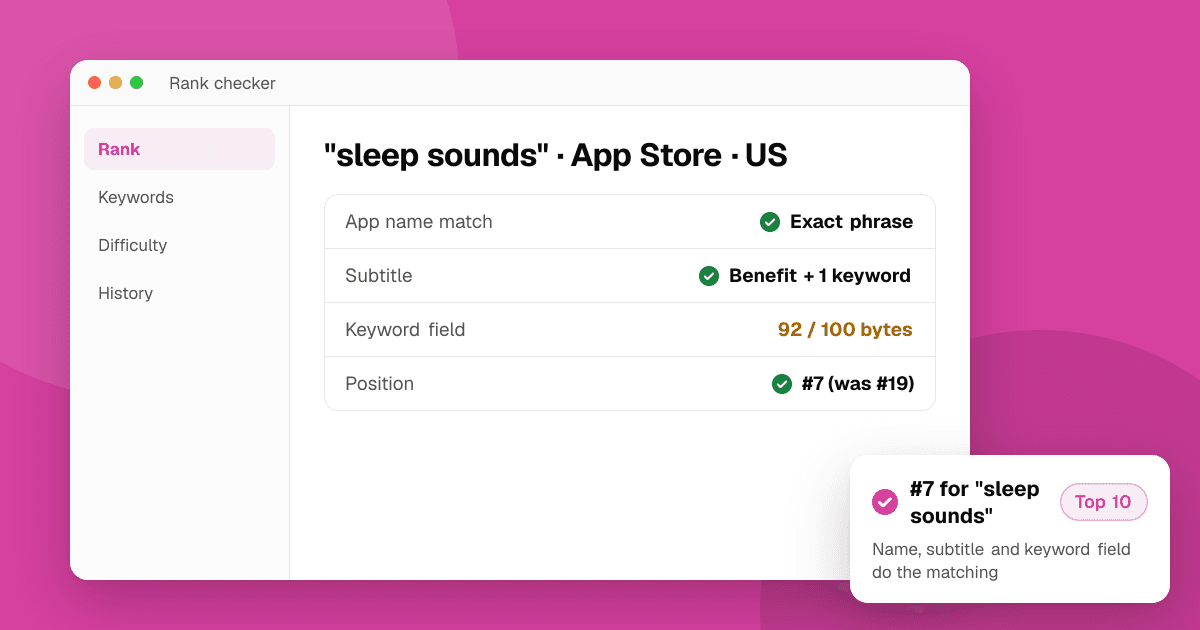
Short answer: App Store search works in two steps. First Apple decides which apps are relevant to a search, mostly from the words in your app name, subtitle and hidden keyword field. Then it decides the order using how people respond: whether searchers tap and download your app, whether they keep using it, and how it's rated. You control the first step completely and influence the second by matching the right searches with a listing that converts. Apple doesn't publish its formula, so treat everything below as well-tested practice rather than a guarantee.
What does App Store search actually read?
Apple's own documentation for developers says the app name, subtitle and keyword field are used for search. Those three are where your keywords must live.
- App name (30 characters): the strongest text signal. Words here are both indexed and visible.
- Subtitle (30 characters): indexed and shown under the name in search results.
- Keyword field (100 characters, hidden): indexed but never shown. It's the place for extra words that don't fit naturally in the name or subtitle. Our iOS keyword field guide covers how to fill it.
Other things that ASO practitioners generally report as indexed, though Apple says less about them:
- In-App Purchase names: promoted In-App Purchases can appear in search results, and their display names are commonly believed to be searchable.
- Developer name: people searching for your company can find your apps.
- Category: helps Apple understand what the app is, though it's not a keyword in the usual sense.
What is not used for App Store search: the description and promotional text. They matter for convincing people once they land on your page, but stuffing keywords there won't move your rank. (Google Play is different; it does read the description. See how Google Play search ranking works.)
How does Apple decide the order?
Once your app is relevant to a search, the order seems to depend on a mix of signals. Apple has never published weights, so the honest version is a list of what consistently correlates with better positions:
- Text relevance. An exact phrase in the app name tends to beat the same words spread across the subtitle and keyword field. Words earlier in the name may count a little more.
- Conversion from that search. If people who search "habit tracker" tap your result and download, Apple has evidence your app answers that search. This is why a listing that looks right for the keyword matters so much.
- Download volume and momentum. Overall downloads, and recent growth, both appear to help, especially for broad keywords.
- Engagement and retention. Apps people open again, and don't delete quickly, look like better results.
- Ratings and reviews. They're a quality signal and strongly affect whether a searcher taps. Earn them by making the app good and using Apple's official review prompt at a sensible moment. Never offer rewards for ratings or trade them with other developers; Apple forbids it. Our guide on asking for reviews the right way explains what's allowed.
- Freshness. Regular updates don't directly boost rank, but they keep the app working well, and updating is when you can change your name, subtitle and keyword field.
Search results are also partly personal: someone who already has your app, or similar apps, may see a slightly different list. That's one reason to check rankings as a signed-out visitor rather than on your own phone.
Why do small apps struggle for broad keywords?
For a phrase like "photo editor", the top results have years of downloads, ratings and conversion data behind them. Matching the text gets you into the results, but probably on page eight.
The opening for a small app is specificity. "Photo editor for film grain" or "receipt scanner for freelancers" has far fewer searches, but the big apps don't target it directly, so text relevance and conversion carry more weight. Those long-tail keywords are where most indie apps earn their first steady search traffic.
How do I rank higher on the App Store, step by step?
- Pick one main keyword per listing. Choose a phrase that describes your app, has real searches and isn't owned by giants. Our keyword difficulty checker shows how many of the top 10 apps already use the phrase in their names, and the keyword suggestion tool shows what people actually type.
- Put it in the app name. "Brand: Main Keyword" is the common pattern. Keep the brand readable; Apple rejects names that are lists of keywords.
- Use the subtitle for the second idea. A benefit phrase with one or two more keywords, written for humans.
- Fill the keyword field with the rest. No repeats from the name or subtitle, no spaces after commas. The iOS keyword field optimizer cleans it up and counts bytes the way Apple does.
- Make the first screenshot answer the search. Someone searching "sleep sounds" should see sleep sounds in your first image. Better conversion is a ranking signal in itself.
- Check where you rank. Run your keywords through the app rank checker. It searches the App Store live, the way a signed-out visitor in your chosen country would, shows your exact position on the first screen of results, and estimates positions further down (up to 200).
- Change one thing, then wait. Metadata changes need an app update or a new version to go live. Give each change a few weeks before judging it.
How long does it take to see results?
Text changes can affect which searches you appear for within days of a version going live. Climbing the order takes longer, because Apple needs new download and engagement data for that search. Many developers judge a keyword change after two to four weeks. Watch App Store Connect's search impressions and downloads from search alongside your positions.
What should I avoid?
- Competitor brand names in your name, subtitle or keywords. Apple can reject the update, and the other company can file a trademark complaint. See common App Store rejections.
- Keyword-stuffed names like "Planner Todo List Tasks Calendar Reminder". They read badly, convert badly and risk rejection.
- Claims like "#1" or "Best" that you can't back up.
- Buying downloads or ratings. Apple detects manipulation and can remove an app from search or the store entirely.
Next steps
Write down five keywords your ideal user would type, check their difficulty, and run each one through the app rank checker so you know where you start. Then rework your name, subtitle and keyword field around the best two or three, and recheck after the update goes live. For the full picture of store listings, read our App Store optimization guide for indie developers, and for tracking positions over time, see how to track your app's keyword rankings.
Frequently asked questions
Does the App Store description affect search ranking?
No. Apple uses the app name, subtitle and keyword field for search, not the description or promotional text. The description still matters because it helps people decide to download, and downloads from a search are a ranking signal.
What are the main App Store ranking factors?
Text relevance from the app name, subtitle and keyword field decides which searches you appear in. The order then seems to depend on how searchers respond (taps and downloads), overall download volume, engagement and retention, and ratings. Apple doesn't publish the exact weights.
How can a new app rank on the App Store?
Target specific, lower-competition phrases rather than broad ones, put the main phrase in your app name, and make your first screenshot match that search. Small apps rarely win broad keywords early, but they often reach the top 10 for specific long-tail phrases.
Why is my App Store ranking different on my phone?
Search results can be personalized and differ by country, device and whether you already have the app. To see a neutral position, check from a signed-out view in the right country, which is what our free rank checker does.
Do In-App Purchase names help App Store search?
Promoted In-App Purchases can show in search results, and practitioners commonly treat their names as searchable. Apple documents less about this than about the name, subtitle and keyword field, so use descriptive purchase names but don't rely on them as your main keyword strategy.