How Google Play search ranking works, and how to rank higher
What decides your position in Google Play search: title and description text, how people respond to your listing, and app quality. Practical steps to rank higher.
· 6 मिनट में पढ़ें
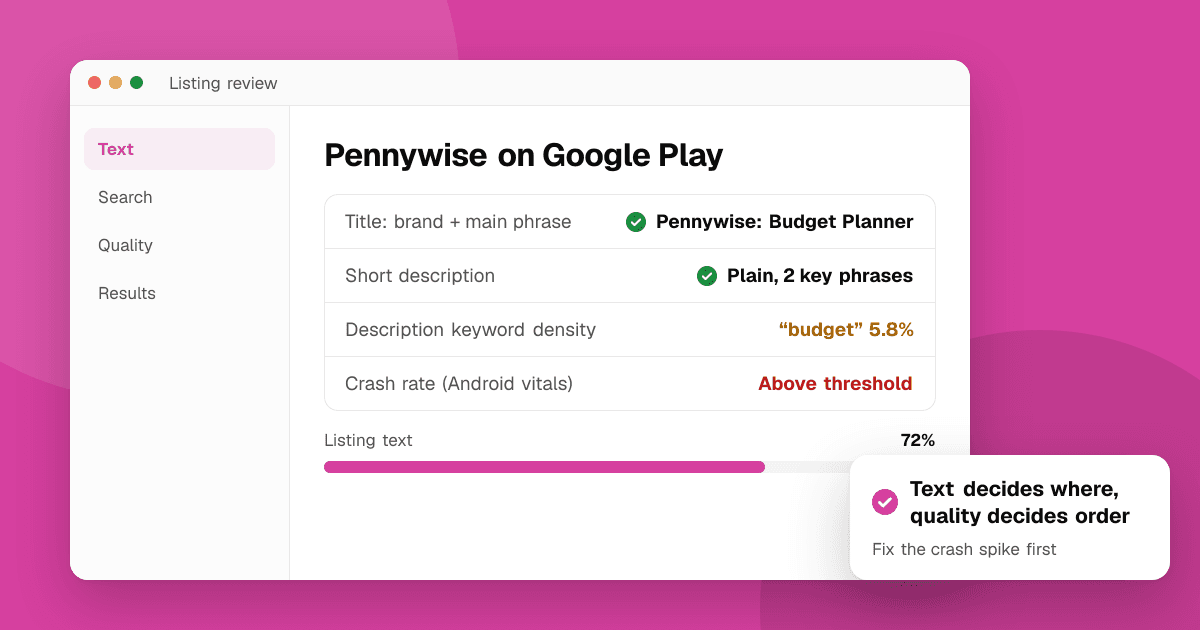
Short answer: Google Play decides which searches you appear in mainly from your listing text (title, short description and full description), and decides your order using how relevant you are and how well your app performs: how people respond when they see you in search, whether they keep using the app, and its technical quality. Google doesn't publish the formula, so treat everything below as what Google has said publicly plus what ASO practitioners generally observe. To rank higher: put your main phrase in the title, write a clear short description, use your key phrases naturally in the description, and fix quality problems.
What does Google say about how Play search works?
Google's guidance for developers says, in broad terms, that store listing text helps people and Google Play understand what your app does, and that Play aims to show high-quality, relevant apps. Google also says it uses app quality and user signals in how it recommends and ranks apps, and it points developers to Android vitals for technical quality. It doesn't list weights or exact factors.
So the practical model is two questions:
- Is your app relevant to this search? Mostly text.
- Among the relevant apps, which is best for this person? Performance and quality.
Which listing fields matter for Google Play search?
Unlike the App Store, Google Play has no hidden keyword field. It reads the text people can see:
- Title (30 characters). The strongest text signal. Use your brand plus your most important phrase: "Pennywise: Budget Planner" rather than just "Pennywise".
- Short description (80 characters). Shown near the top of the listing and widely treated by ASO practitioners as a strong signal. Say what the app does in plain words with one or two key phrases.
- Full description (up to 4,000 characters). Google reads it, so mention your key phrases naturally where they fit. Write for people first: clear benefits, short paragraphs, bullet points.
- Developer name also appears in search and can help if it's descriptive, but don't rename your account just for that.
Check every field's length as you write with the character counter.
How many times should a keyword appear in my description?
There's no published number, and repeating a phrase over and over doesn't help. Google's policies treat keyword stuffing and repetitive text as spam, and it reads badly to people.
A practical approach:
- Use your main phrase in the title, once in the short description, and a few times naturally across the full description.
- Use variations people actually search ("budget planner", "monthly budget", "spending tracker") rather than the same phrase again.
- Check density with the keyword density checker, which flags words that are overused. Read keyword density for Google Play descriptions for more.
What performance signals affect Google Play ranking?
ASO practitioners generally see these matter, consistent with Google's public statements about quality and user signals:
- Response to your listing in search. When people see your app for a phrase, do they open the listing and install? Your icon, title, screenshots and short description drive this.
- Installs that stick. Uninstalls soon after installing are a bad signal; retention and engagement are good ones. See how to keep users coming back.
- Technical quality. Android vitals tracks crash and ANR ("app not responding") rates, and Google has said it may reduce the visibility of apps that exceed its bad-behavior thresholds. Fixing crashes isn't just good for users; it protects your discoverability. See crash reporting for indie developers.
- Ratings and reviews. They're visible on your listing and are among the signals stores consider. Earn them by making the app good and using the official in-app review prompt at a natural moment; ask the right way, never with rewards or for a particular number of stars.
- Freshness. Regular, meaningful updates show the app is maintained.
Does Google Play search differ by country and language?
Yes. Each country has its own results, and your listing can have translations per language. A strong ranking in the United States says little about Brazil or Indonesia.
- Translate and localize your title, short and full description for important markets; people search with local phrases, not translated English.
- Check rankings per country with the app rank checker, which lets you pick the storefront.
What doesn't help Google Play ranking?
Some tactics are popular but either don't work or put the app at risk:
- Keyword stuffing in the title or description. It reads badly, can break Play's metadata policy, and gets listings rejected or limited.
- Competitor names in your text. Using other brands' names to show up in their searches is against Play's policies.
- Words like "best", "#1" or "free" in the title. Play's metadata policy restricts promotional claims in titles and icons.
- Buying installs or reviews. Fake activity breaks Play's policies and can get the app removed; it also doesn't create the retention signals that matter.
- Changing everything every week. You'll never learn what worked. Change one thing, then wait two or three weekly checks.
How do I rank higher on Google Play, step by step?
- Pick realistic phrases. Use keyword suggestions to see what people type, then the keyword difficulty checker to avoid phrases where every top-10 app already has the exact words in its name. Read keyword difficulty explained.
- Put the main phrase in your title, keeping the brand readable.
- Rewrite the short description around the problem you solve, with one or two key phrases.
- Rework the full description: a strong first paragraph, scannable features, key phrases used naturally. Our guide to app descriptions helps.
- Improve conversion from search: clearer icon and first screenshots. See screenshots and icons that convert.
- Fix crashes and ANRs flagged in Android vitals.
- Measure. Check positions weekly with the app rank checker and compare with Play Console's store listing acquisition data. Our guide to tracking keyword rankings has a routine.
How do I see where I rank right now?
Searching on your own phone is skewed by your history and installed apps. Our free app rank checker searches Google Play the way a signed-out visitor in your chosen country would, looks at about the top 30 results (what Play's search page shows), and gives your position plus the top 10 apps for the keyword. It never reads ratings or downloads. For a full walkthrough, see how to check your app ranking for a keyword.
Next steps
Audit your listing with the free ASO audit checklist, pick three target phrases, update your title and short description, then track the result for a month. Compare with how App Store search ranking works if you publish on both stores, and read our full App Store optimization guide.
Frequently asked questions
What are the main Google Play ranking factors?
Google doesn't publish a formula. Listing text (title, short description, full description) decides which searches you're relevant for, and ASO practitioners generally see performance signals such as response to your listing, retention, technical quality and ratings affect your order.
Does Google Play have a keyword field like the App Store?
No. Google Play reads your visible text: title, short description and full description. Use key phrases there naturally instead of stuffing them.
Do crashes affect my Google Play ranking?
Google says it considers app quality and may reduce the visibility of apps with crash or ANR rates above its Android vitals thresholds. Fixing them helps both users and discoverability.
How long does it take to rank higher on Google Play?
There's no fixed time. Listing text changes often show within days to a couple of weeks; performance-based gains build over weeks and months as more people install and keep using the app.
How can I check my Google Play keyword ranking?
Use an unpersonalized rank checker. TrueLaunch's free app rank checker searches Google Play signed out in the country you choose and shows your position in about the top 30 results, plus the top 10 apps.