App Store keyword difficulty explained: how hard is it to rank?
What keyword difficulty means for Google Play and the App Store, how to judge a top 10 yourself, how our free difficulty score works, and how to pick winnable keywords.
· 6 min read
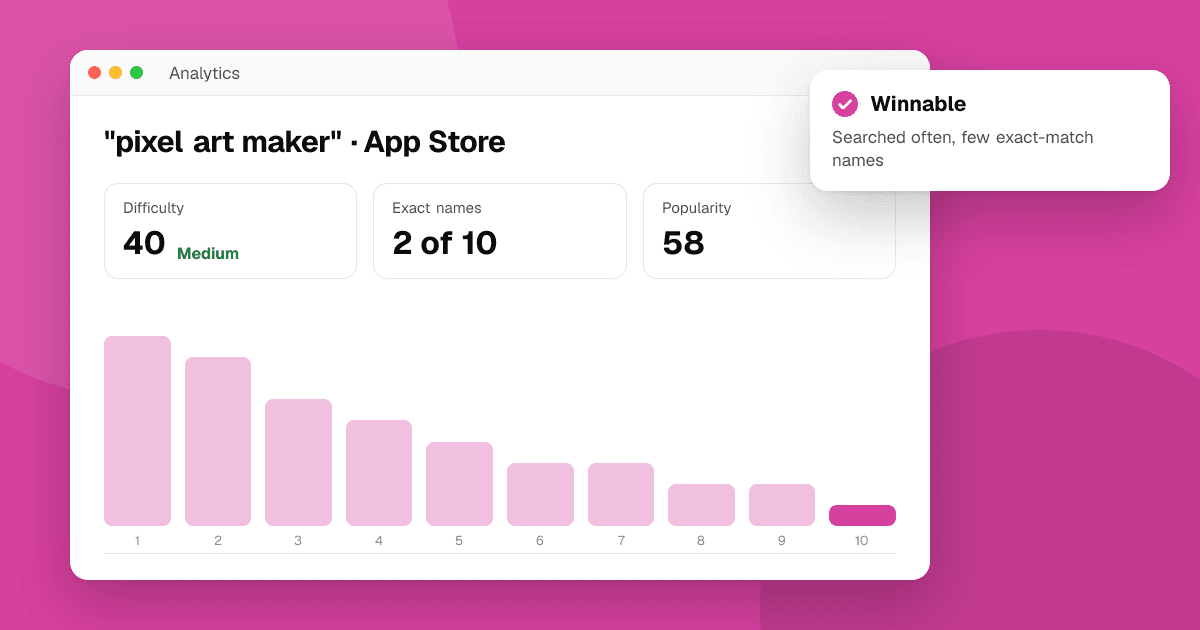
Short answer: keyword difficulty is an estimate of how hard it is to get into the top 10 store results for a phrase. The best evidence is the current top 10 itself: if most of those apps put the exact phrase in their name, you'll struggle to pass them; if few do, there's room. Our free keyword difficulty checker scores that from 0 to 100 using live results, and pairs it with a popularity estimate, so you can pick phrases that are both searched and winnable.
What does keyword difficulty mean for apps?
On the web, difficulty usually means how many strong backlinks the top pages have. Stores don't work that way. Google Play and the App Store rank apps for a search using the words in the listing (relevance) and how people respond to the app (installs, engagement and other signals the stores don't fully publish).
For an indie developer, the practical question is simpler: if I target this phrase well, can I realistically reach the first screen of results? That depends on who is already there and how well they match the phrase.
How do I judge a top 10 by hand?
Search the phrase in the store, signed out and in the right country, and look at the first ten apps. Ask four questions:
- How many put the whole phrase in their name? Ten apps called "Something: Habit Tracker" means the store sees many strong, exact matches. You need the phrase in your name and more.
- How many use all the words, in another order? "Tracker for Daily Habits" is a partial match. These are weaker competitors for the phrase.
- Are the results even about the phrase? If half the top 10 is loosely related, few apps target it directly, which is an opening.
- Is the list full? A very specific phrase can return only a handful of apps. Few results usually means little competition, and often few searches as well.
Then look at who those apps are. A top 10 made of household names is hard for any new app. A mix of small and rarely updated apps is a realistic target.
How does the TrueLaunch difficulty score work?
The keyword difficulty checker automates the first questions above. It searches the phrase live, as a signed-out visitor in the store and country you pick, then looks at the top 10:
- Exact name matches: apps whose name contains the whole phrase. They count fully.
- Partial name matches: apps whose name contains all the meaningful words of the phrase, but not as the exact phrase. They count a little over half as much.
- How full the top 10 is: fewer than ten results lowers the score.
Name matches make up three quarters of the score and fullness the last quarter. The result is a number from 0 to 100 with a label: low, medium, high or very high. The tool shows the counts behind the number, so you can see why a phrase scored the way it did.
What the score never uses: store ratings, review counts or download numbers. We don't read them for any tool. That also means the score can't tell you whether the top apps are huge brands; glance at the top 10 the tool lists to judge that yourself.
What is a good difficulty score?
There's no universal threshold, but as a rule of thumb for a new or small app:
- Low (under 30): few apps target the phrase directly. If people search it, you can often reach the top 10 with the phrase in your name or subtitle.
- Medium (30 to 54): some competition. Worth targeting if the phrase matches your app closely.
- High (55 to 79): many direct matches. Target it in your description or keyword field while you build history, rather than spending your title on it.
- Very high (80 and up): the top 10 is full of exact matches. Usually a long-term goal, not a launch target.
Difficulty alone is half the picture. A phrase nobody searches is easy to win and worthless. That's why the checker also shows popularity, estimated from how quickly the store's autocomplete suggests the phrase; see App Store search popularity explained.
How do I choose popular-but-winnable keywords?
Combine both scores:
| Popularity | Difficulty | What to do |
|---|---|---|
| High | Low or medium | Your best targets. Put them in your name, subtitle or short description. |
| High | High or very high | Worth having in your keyword field or description; aim for the title later. |
| Low | Low | Fine as supporting long-tail phrases, especially if they describe your app exactly. |
| Low | High | Skip. |
Long, specific phrases often land in the top-left cell. "Habit tracker" is crowded; "habit tracker for ADHD" may not be. See long-tail keywords for apps.
Recheck your chosen phrases after each listing update. Difficulty changes as competitors rename their apps or new apps arrive, and a phrase that was medium at launch can become crowded within months.
How do I find phrases to score?
Start from what people actually type. The keyword suggestion tool lists the store's autocomplete for any seed word, with an A to Z expansion, and sends any phrase straight to the difficulty checker. Phrases competitors rank for are another source: the competitor keyword finder pulls them from a rival's listing. Our guide to finding app keywords with autocomplete walks through the whole process.
Does my current rank change the difficulty?
The score is the same for everyone, but your situation isn't. If you already rank 12th for a high-difficulty phrase, you're close, and a better title might move you onto the first screen. Check your position with the app rank checker before you dismiss a hard phrase.
What are the limits of any difficulty score?
- Stores don't publish their ranking formula. Every difficulty score, ours included, is an estimate built from what's visible.
- Results change by country, language and over time. Recheck before a big listing change.
- Names aren't everything. An app can rank without the phrase in its name, through history or (on the App Store) its hidden keyword field. How App Store search ranking works and how Google Play search ranking works cover the other signals.
Next steps
Take your shortlist of phrases and run each through the keyword difficulty checker. Keep the ones with high popularity and low or medium difficulty, check your current rank for each with the app rank checker, and update your listing. Our keyword research guide explains where each phrase should go.
Frequently asked questions
What is keyword difficulty in ASO?
It's an estimate of how hard it is to reach the top 10 store results for a phrase. It's usually judged from the apps already in the top 10 and how closely their names match the phrase.
How is the TrueLaunch difficulty score calculated?
From the live top 10 only: apps with the whole phrase in their name count fully, apps with all its words count a little over half, and fewer than ten results lowers the score. Name matches are three quarters of the score, fullness one quarter.
Does the difficulty score use ratings or downloads?
No. TrueLaunch never reads store ratings, reviews or download counts. The score uses only the names and number of apps in the current results.
Is a low difficulty keyword always a good target?
Only if people search it and it describes your app. Check popularity alongside difficulty: a phrase nobody searches is easy to win but brings no installs.
Why do different ASO tools give different difficulty scores?
Each tool uses its own inputs and formula, and stores don't publish theirs. Treat any score as a guide and look at the actual top 10 before deciding.