How to find your competitors' app keywords (and where they rank)
Find the keywords competing apps target on Google Play and the App Store, check where they rank for each, and turn the gaps into targets for your own listing.
· 6 menit baca
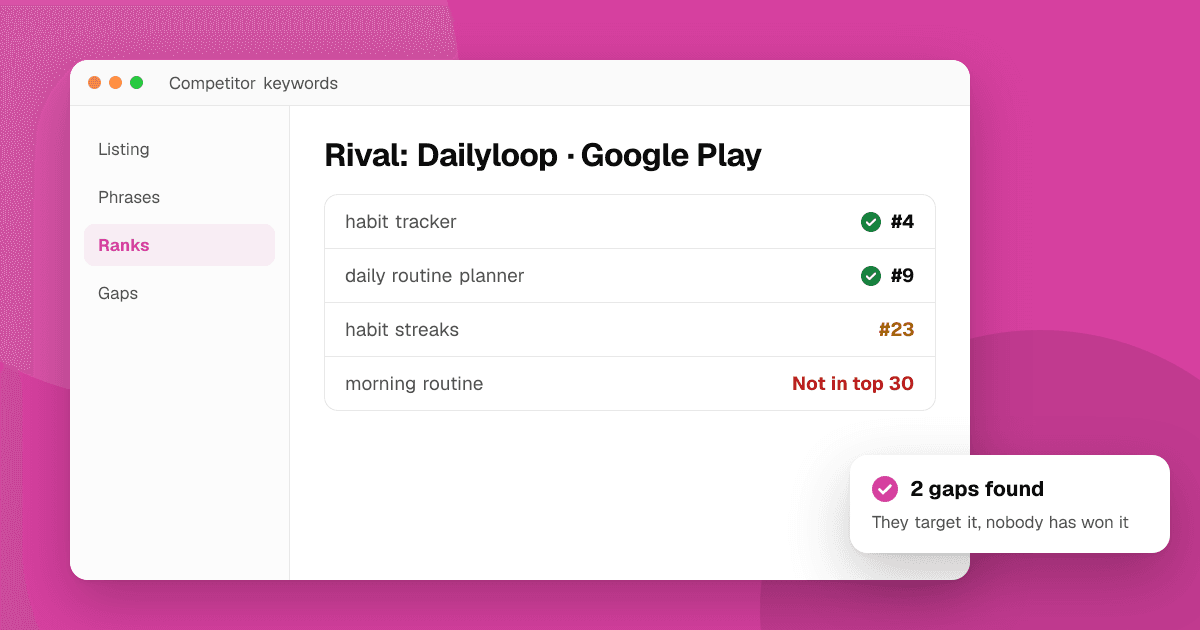
Short answer: a competitor's keywords are mostly visible in its listing: the app name, the subtitle or short description, and the phrases its description repeats. Collect those phrases, search each one in the store and note where the competitor ranks. Phrases where it ranks well show you what works in your category; phrases where it ranks badly or not at all are gaps you may be able to win. Our free competitor keyword finder does both steps from one store link.
Which competitors should I research?
Not the biggest app in your category. Pick three to five apps that are close to yours in size and purpose:
- Apps that show up when you search your main phrase, especially from position 5 to 30. They rank, but not because of a famous brand.
- Apps users mention in your reviews or support emails: "I switched from X".
- New apps that climbed quickly. They often found a phrase others ignore.
A giant brand ranks for almost everything because of downloads and brand searches. You learn more from an app that got to position 4 with good metadata.
Where can I see a competitor's keywords?
Every store listing shows most of its keyword strategy in plain sight:
- App name. The words after the brand are usually the main target: "Brand: Habit Tracker" targets "habit tracker".
- Subtitle (App Store) or short description (Google Play). The second most important phrase.
- Full description. On Google Play, the description is indexed, so phrases repeated several times are likely targets. On the App Store, the description isn't used for search ranking, but it still shows what the developer thinks matters.
- Screenshot captions. Many developers write their key phrases on the first screenshots.
- What's New text and in-app event names, which sometimes target seasonal phrases.
What you can't see: the App Store's hidden 100-character keyword field. You can only infer it by searching phrases the app might target and checking whether it shows up.
How do I check where a competitor ranks for each phrase?
Search each phrase in the store, signed out, in the right country, and count down the results. Do it in a private browser window so your own history doesn't change what you see. This is slow for more than a handful of phrases.
The competitor keyword finder automates it. Paste a Google Play or App Store link and it:
- Reads the app's public listing.
- Pulls up to 8 likely phrases from the app's name, its subtitle or short description, and the phrases its description repeats about its topic.
- Searches each phrase live in the store and country you chose, the way a signed-out visitor would.
- Shows the app's position for each, best positions first.
On Google Play, positions cover the top 30 or so results, exactly as the store shows them. On the App Store, the first screen of results is exact and positions further down, up to 200, are estimates from Apple's public search API. Answers are cached for a few hours. The tool never reads store ratings, reviews or download counts.
To check a phrase the finder didn't pick, use the app rank checker with the competitor's link.
How do I turn competitor keywords into my own targets?
Put the results in three groups:
- Strong for them, relevant for you. The competitor ranks in the top 10. The phrase works in your category, but expect a fight. Check it in the keyword difficulty checker before you target it.
- Weak for them, relevant for you. The competitor targets the phrase in its listing but ranks 20th or lower, or not at all. This is often the best opportunity: people search it, and the obvious players haven't won it.
- Not relevant for you. Skip it, however popular it is. Ranking for a phrase your app doesn't match brings installs that uninstall.
Then look for what nobody targets. Run your own seed words through the keyword suggestion tool and compare: phrases that real people search but none of your competitors use in their names are a gap. We cover this in how to find app keywords with store autocomplete.
Can I use a competitor's name as a keyword?
No. Both Apple's and Google's rules restrict using another company's trademark in your app name, subtitle, keyword field or description, and it can get your update rejected or your listing removed. Using a competitor's brand as a search in your research is fine; putting it in your metadata is not. Describe what your app does instead: someone searching for a famous meditation app might also search "guided meditation", which you can target.
What does a simple competitor keyword sheet look like?
One row per phrase, one column per app, including yours:
| Phrase | Rival A | Rival B | You | Difficulty |
|---|---|---|---|---|
| habit tracker | 4 | 12 | 31 | High |
| daily routine planner | 9 | Not found | 18 | Medium |
| morning routine | 27 | Not found | Not found | Low |
Read across each row. Where every rival is strong, the phrase is proven but crowded. Where rivals are weak and difficulty is low, you have a candidate for your subtitle or short description. Where you already sit just outside the top 10, a small listing change may be enough.
How often should I check competitors?
Monthly is enough for most indie apps. Rankings shift with updates, seasons and new entrants. When a competitor changes its title or subtitle, that's a signal: it found something worth testing, or something stopped working. Save each month's results so you can see the trend; see how to track app keyword rankings.
What are the limits of competitor keyword research?
- You see the visible part only. The App Store keyword field stays hidden.
- Ranking isn't only metadata. Stores also weigh signals you can't see, like installs and engagement. A competitor might rank because of its history, not its words. How App Store search ranking works and how Google Play search ranking works explain what we know.
- Positions vary. Results change by country, device and over the day. A single check is a snapshot.
Next steps
Pick three competitors that rank around positions 5 to 30 for your main phrase and run each through the competitor keyword finder. List the phrases where they rank weakly, check those in the keyword difficulty checker, and see where you stand with the app rank checker. Then update your listing using our keyword research guide and the full App Store optimization guide.
Frequently asked questions
Can I see an app's hidden App Store keywords?
No. The 100-character keyword field is private to the developer. You can only infer it by searching phrases the app might target and checking whether it appears in the results.
How does the competitor keyword finder pick phrases?
It reads the app's public listing and takes up to 8 phrases from its name, its subtitle or short description, and phrases its description repeats about its topic. Each phrase is then searched live in the store and country you choose.
Is it allowed to use competitor names in my listing?
No. Both stores restrict using other companies' trademarks in metadata. Research competitors freely, but describe your own app with generic phrases.
Why does a competitor rank for a phrase it doesn't use?
Stores also consider signals beyond the listing text, and on the App Store the phrase may be in its hidden keyword field. Ranking without the words in the name usually means strong history or a keyword field match.
How many competitors should I research?
Three to five close competitors is enough. Pick apps of a similar size that rank in the top 30 for your main phrase rather than the category's biggest brand.