How to create a waitlist for your app: form, emails and template
How to create a pre-launch waitlist for an app or game: the signup form, a waitlist page template, waitlist emails, referral rewards and which waitlist software to use.
· 6 min read
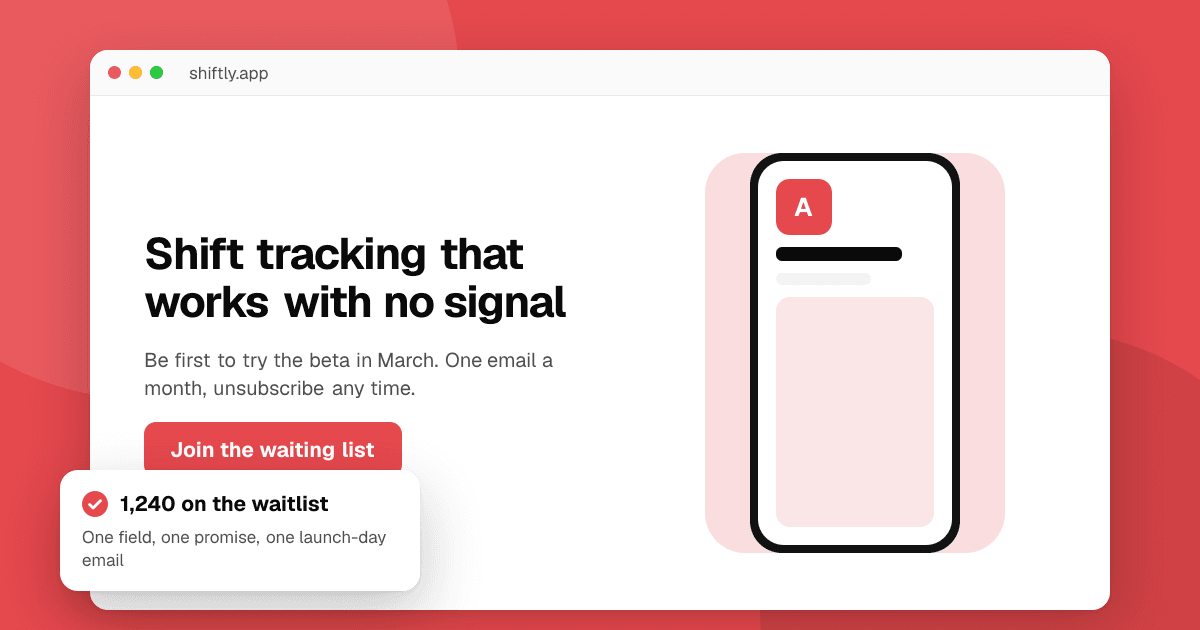
Short answer: a waitlist is a one-page site with a single email field ("Join the waiting list"), a clear promise of what people get and when, and a confirmation email. Build it with any form tool or waitlist software, point every post and video about your app to it, email the list every few weeks with real progress, and send one launch-day email with the store links. Referral rewards (move up the list, early access) can grow it faster, but never reward store ratings or reviews.
Why create a waitlist before launch?
Because launch day goes very differently when people are already waiting. A waitlist turns the attention you get while building (a post that does well, a short video, a community thread) into people you can reach again on the day it matters. It also tells you early whether anyone wants the app: if nobody joins after a month of sharing it, that's a signal to change the pitch or the idea before you build more. See how to validate an app idea.
A waitlist and an email list are almost the same thing. The difference is the promise: a waitlist says "you'll get it first". For what to send over months of building, see how to build an email list before you launch.
What does a waitlist page need?
Keep it to one screen on a phone:
- A headline that says who it's for and what it does. "A shift tracker for nurses that works with no signal" beats "The future of shift work".
- One image or short clip of the app, even an early design.
- One email field and one button. "Join the waiting list" or "Get early access". Every extra field (name, company, phone) loses signups.
- What happens next: "We'll email you when the beta opens, and on launch day. Nothing else."
- A privacy line: what you do with the email and how to leave the list.
For the rest of the page, see how to build a landing page for your app.
Waitlist template
Copy this structure and fill in your own words:
[App name]: [what it does] for [who]
[One sentence on the problem it solves.]
[Screenshot or 10-second clip]
[Email field] [Join the waiting list]
Be first to try the beta and get the launch-day [discount / early access]. One email a month, unsubscribe any time.
[Short line on privacy, with a link to the privacy policy]
How do I create a waitlist signup form?
Pick the simplest option that does what you need:
- A form on your own site connected to your email tool (most email newsletter services include a free signup form and a hosted landing page).
- A no-code form (a form builder or a site builder's built-in form) that sends entries to a spreadsheet, then import them into your email tool.
- Dedicated waitlist software, which adds a position number, referral links and leaderboards. Examples include LaunchList, Waitlister, GetWaitlist, Prefinery and Viral Loops. Compare what you'd actually use: if you don't need referrals, an email tool's free form is enough.
Whatever you choose, check three things before you share the link: it works on a phone, it sends a confirmation email, and you can export your list, so you're never locked into one tool.
Is there a free alternative to Viral Loops or Prefinery?
For most indie apps, yes: an email tool's free signup form plus a simple "share this link" line in the welcome email does the job. Referral-based waitlist tools are worth paying for when sharing is part of the product (a social app, a multiplayer game) and you'll actually run the referral rewards. Check each tool's current pricing and limits on its own site, as they change.
Should I add referral rewards to my waitlist?
They can help, if the reward is real and honest:
- Good rewards: earlier access to the beta, moving up the list, a launch-day discount on a paid plan, an in-game cosmetic at launch, your name in the credits.
- Milestone rewards ("invite 3 friends, get beta access a week early") work best when the milestones are small and the reward arrives on time.
- Never reward people for store ratings or reviews, or ask them to rate the app in return for anything. That breaks Google Play and App Store rules.
- Don't count fake or duplicate signups toward rewards; confirm emails first (double opt-in) so the numbers stay real.
What waitlist emails should I send?
Four kinds, kept short and personal:
1. Welcome email (right after signup)
Subject: You're on the [App] waitlist
Thanks for joining! [App] helps [who] [do what]. I'm building it now and expect the beta in [month].
I'll email you about once a month with progress, and the day it launches. Reply any time and tell me what you'd want it to do; I read every reply.
2. Progress update (every 2 to 4 weeks): one new thing you built, one screenshot or clip, one question for readers.
3. Beta invitation: the Google Play closed testing link or TestFlight public link, what you want testers to try and how to send feedback. For Android you'll need 12 testers for 14 days.
4. Launch-day email: "It's live", the store links, the one thing you'd most like feedback on. For full examples, see product launch announcement examples.
How do I keep a waitlist legal and respectful?
- Only add people who signed up themselves. Never import contacts or buy lists.
- Say what you'll send and how often, and keep to it.
- Use double opt-in where the law expects it (much of the EU and Germany in particular), and always include an unsubscribe link.
- Store as little as you need: an email address is usually enough.
- Mention the list in your privacy policy.
What mistakes should I avoid?
- Collecting emails and then going quiet for six months. People forget who you are. Send something every few weeks.
- Asking for too much in the form. One field is enough.
- A vague promise. "Stay tuned" gets fewer signups than "Get the beta first in March".
- No launch-day email. The whole point of the list is that one email.
Next steps
Put a one-field waitlist page live this week and add the link to every post about your app. When your app is in the store, list it on TrueLaunch and schedule a launch day: people can tap Notify me on upcoming launches, so your launch has a second waiting list on the board itself. Then send your launch-day email with both links.
Frequently asked questions
How do I create a waitlist for my app?
Make a one-page site with a headline, an image of the app and a single email field. Connect it to an email tool or waitlist software, send a confirmation email, and share the link everywhere you talk about the app.
What should a waitlist email say?
The welcome email thanks people, says what the app does, when to expect the beta and how often you'll write. Later emails share progress, invite people to the beta and announce launch day with the store links.
Do I need paid waitlist software?
Usually not. A free email tool's signup form is enough for most indie apps. Referral-based waitlist tools are worth it when sharing is central to your app and you'll actually run the referral rewards.
Can I offer rewards for joining or referring friends to a waitlist?
Yes, honest rewards like earlier beta access, moving up the list or a launch discount are fine. Never reward store ratings or reviews, which breaks App Store and Google Play rules.