How to track your app's keyword rankings without a paid tool
A simple weekly routine and spreadsheet for tracking App Store and Google Play keyword rankings, plus how to tell real movement from day-to-day noise.
· 6 min de lectura
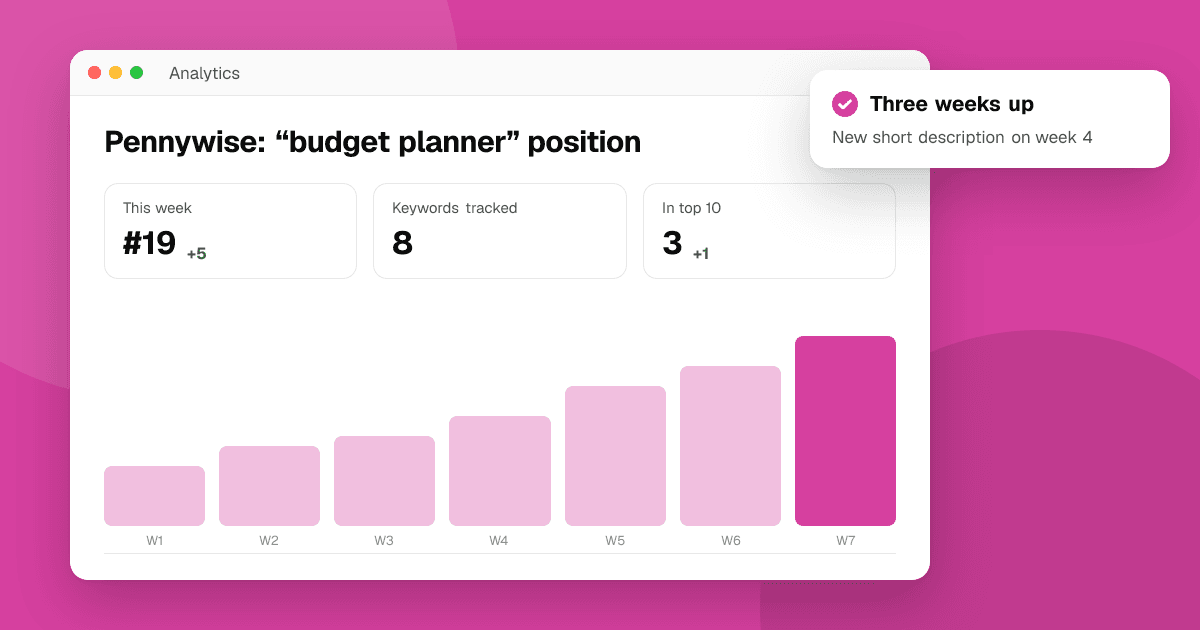
Short answer: choose 5 to 15 keywords per store and country, check each one at the same time every week with a free app rank checker, and log the position in a spreadsheet with the date and any listing change you made. Judge trends over three to four weeks, not single days, and always compare rank against the store's own impression and install numbers before deciding something worked.
Why track keyword rankings at all?
Your store console tells you how many people saw and installed your app from search. It doesn't tell you which searches you appear in, or where. Tracking rankings fills that gap:
- You see whether a listing change worked. New title, new short description: did the target phrases move?
- You catch problems early. A sudden drop for your own app name usually means something broke.
- You find quiet wins. Phrases you didn't target but rank well for are hints about what the store thinks your app is about.
Paid ASO platforms automate this with daily tracking across many keywords. When you're starting out, a weekly manual routine gets you most of the value for free.
Which keywords should I track?
Keep the list short enough that you'll actually keep it up. A good starting set per store and country:
- Your app's name, as people would type it.
- Your main phrase, the one in your title.
- Two to four secondary phrases from your subtitle (iOS), short description (Google Play) or keyword field.
- Two or three "stretch" phrases you'd like to rank for in a few months.
- One or two phrases a close competitor ranks for, found with the competitor keyword finder.
If you're unsure which phrases are realistic, check them with the keyword difficulty checker first, and see our guide on keyword difficulty.
What does a simple tracking spreadsheet look like?
One row per check, so you can sort and chart it later:
| Date | Store | Country | Keyword | Position | Band | Note |
|---|---|---|---|---|---|---|
| 2026-11-03 | Google Play | US | budget planner | 24 | Top 30 | baseline |
| 2026-11-03 | Google Play | US | budget planner for couples | 6 | Top 10 | baseline |
| 2026-11-10 | Google Play | US | budget planner | 19 | Top 30 | new short description on 11-05 |
| 2026-11-10 | Google Play | US | budget planner for couples | 4 | Top 10 | |
| 2026-11-10 | App Store | US | shared budget | ≈ 41 | not in first screen | estimate |
Tips for the columns:
- Position: write "–" when you're not found in the scanned results, rather than leaving it blank.
- Band: Top 3, Top 10, Top 30 or not found. Bands are easier to read over time than raw numbers.
- Note: record every listing change, release and anything unusual (a feature, a competitor launch). Without notes, you'll never know why a line moved.
- Estimates: our rank checker marks App Store positions past the first screen as estimates, because they come from Apple's public search API rather than the store page. Mark them in your sheet too.
What's the best weekly routine?
- Same day, similar time. Rankings move during the day; consistency makes weeks comparable.
- Run each keyword through the app rank checker for each store and country you care about. Your recent checks are kept in your browser, so rerunning last week's list is quick.
- Log the results and fill in the note column.
- Look at the store's own numbers: App Store Connect search impressions and downloads, and Play Console's store listing acquisition by search.
- Decide one thing to try, or decide to change nothing this week. Changing too much at once makes results impossible to read.
The checker caches answers for up to a few hours, so running the same keyword twice in one sitting returns the same snapshot, not a new measurement.
How do I tell real movement from noise?
Rankings wobble. A few rules keep you from overreacting:
- Ignore one-week moves of a few places, especially below the top 10. They're often noise.
- Look for three-week trends. Three checks in a row moving the same way is a pattern.
- Watch bands, not decimals. Moving from Top 30 into Top 10 matters; moving from 17 to 15 usually doesn't.
- Check both stores separately. They don't move together.
- Check the country. A change in one storefront doesn't mean a change everywhere.
Should I track rankings on both stores?
Only if you publish on both. When you do, keep them as separate rows and separate lists of keywords. People phrase searches differently on iPhone and Android, the App Store has a hidden keyword field while Google Play reads your description, and the competition in each store's top 10 is often completely different. A phrase worth targeting on one store can be hopeless on the other, so decide per store.
What makes rankings move?
Stores don't publish their formulas, but ASO practitioners generally see these patterns:
- Listing text. Changing the title, subtitle, short description or iOS keyword field changes which searches you're relevant for. Effects usually appear within days to a couple of weeks.
- Installs and engagement from search. When people who search a phrase install and keep using your app, stores appear to treat you as a better match.
- Quality. On Google Play especially, technical quality such as crash and ANR rates is part of how the store judges apps.
- Updates and seasonality. Search behavior changes with seasons and events; a "tax" app moves very differently in April and August.
- Competitors. A new app or a big update from a rival can push you down without you changing anything.
- Store changes. Both stores adjust search from time to time, moving many apps at once.
Read how Google Play search ranking works and how App Store search ranking works for more.
What if my ranking suddenly drops?
Go through this list before changing anything:
- Did you change your listing? Check your notes column.
- Is it every keyword or one? A drop across all keywords, including your own name, points to a problem with the listing itself; read why your app isn't showing in search.
- Is it one store or country? Narrow it down before you react.
- Did a competitor appear? The top 10 list in the rank checker shows who is now above you.
- Did impressions really fall? If console impressions are steady, the drop may not matter yet.
Next steps
Set up your sheet today with 5 to 10 keywords, run them through the app rank checker, and put a weekly reminder in your calendar. For new keyword ideas use keyword suggestions, and read how to research app store keywords. All our free ASO tools are on the tools page.
Frequently asked questions
How can I track app keyword rankings for free?
Pick 5 to 15 keywords, check each weekly with a free app rank checker such as TrueLaunch's, and log date, store, country, keyword, position and notes in a spreadsheet. Compare the trend with your store console's search impressions and installs.
How often should I check my app's rankings?
Weekly is enough for most indie apps. Check at the same day and time, and judge changes over three or four weeks rather than one day.
How long does it take for keyword rankings to change after a listing update?
Stores don't publish timings. In practice, changes to titles and descriptions often show within days to a couple of weeks. Wait at least two weekly checks before judging a change.
Why did my app's keyword ranking drop?
Common causes are a listing change, a competitor launching or updating, seasonal changes in what people search, quality problems such as crashes, or a store-wide search update. Check whether it affects one keyword or all of them, and one store or both.
Should I track rankings in every country?
Track the countries where most of your installs come from, plus any market you're actively localizing for. Each storefront has its own results, so a ranking in one country says little about another.