How to check your app's ranking for a keyword on Google Play and the App Store
Find your app's real position for any keyword, without your own search history getting in the way, and learn what the number means and what to do next.
· 7 min de leitura
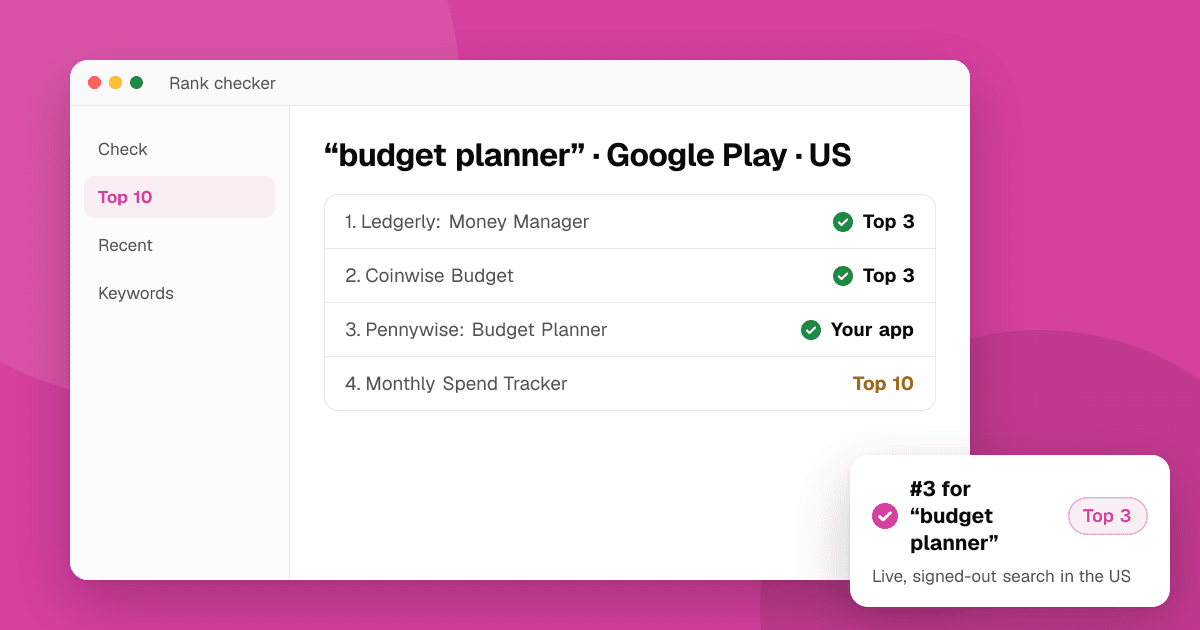
Short answer: pick one keyword, then search it the way a new visitor would: signed out, in the country you care about, on the right store. Count down the results until you find your app. Doing that by hand is slow and your own phone personalizes results, so use a free app rank checker: type the keyword, paste your store link, choose the store and country, and you get your position plus the top 10 apps you're up against.
What does "app ranking for a keyword" mean?
When someone types a phrase into the Google Play or App Store search box, the store returns a list of apps in a particular order. Your keyword ranking is your place in that list: #1 is the first result, #12 is the twelfth, and "not ranked" means you weren't in the results the store showed.
A few things make this number different from a website's Google ranking:
- It's per store. Google Play and the App Store have separate search engines and separate results. Ranking #3 on one tells you nothing about the other.
- It's per country. The same phrase can give very different results in the United States, India and Brazil, because the apps available, the language and what people install all differ.
- It's per phrase. "habit tracker" and "habit tracker app" are different searches with different results, even though they look nearly the same to you.
- It moves. Stores recalculate constantly. A position is a snapshot, not a permanent fact.
Why can't I just search on my own phone?
You can, and it's a fine sanity check, but your phone is the worst place to measure an honest ranking:
- You've installed your own app. Stores may show installed apps differently, or hide them from some result types.
- Your history shapes results. What you've browsed and installed can influence what you're shown.
- You're in one country. Your phone searches your own storefront. If your users are elsewhere, you're looking at the wrong list.
- Counting is tedious. Scrolling to position 37 and counting carefully, for ten keywords, on two stores, every week, isn't a good use of a solo developer's time.
That's why rank checkers search the store the way a signed-out visitor would, in the country you choose.
How do I check my app ranking with a free tool?
Our app rank checker does exactly this, free and without sign-up:
- Enter the keyword exactly as people type it into the store, for example "budget planner" or "pixel art maker".
- Add your app. Paste the store link (the most reliable), or type the Google Play package name, the App Store ID or the app's name.
- Pick the store and country.
- Read the result: your position, a band such as Top 3, Top 10 or Top 30, and the top 10 apps for that keyword with your app highlighted.
How it works, so you can read the number correctly:
- It runs a live, unpersonalized search, the way a signed-out visitor in that country would see it.
- On Google Play it looks at about the top 30 results, which is what the store's search page shows. If you're not there, you're reported as outside the top 30 rather than given a guessed number.
- On the App Store, the first screen of results (about 10 to 12 apps) is in the store's exact order. Beyond that, it looks further, up to 200 results, through Apple's public search API. That API's order is close to the App Store's but not identical, so those positions are marked as estimates.
- Answers are cached for up to a few hours, so checking the same keyword twice in a row returns the same snapshot.
- It never uses ratings, reviews or download counts. It only reads positions, names, developers and icons.
What is a good keyword ranking?
It depends on the keyword, but as a rough guide:
- Top 3: you'll get a real share of the taps for that search. Protect it.
- Top 10: you're visible on the first screen or two. Worth pushing up if the keyword is relevant.
- 11 to 30: people do scroll, but much less. This is where most new apps start for competitive phrases.
- Not in the top 30: the keyword is either too competitive for now, or the store doesn't see your listing as relevant to it.
Don't chase one big phrase. A new app ranking #4 for "habit tracker for students" often gets more installs than one ranking #60 for "habit tracker". Check the keyword difficulty before you commit to a phrase, and read long-tail keywords for apps for why specific phrases win early.
Why is my ranking different from what I see on my phone?
Common reasons, roughly in order of how often they explain the gap:
- Different country or language. Check that you picked the storefront you're actually searching from.
- Personalization. Your phone's results are shaped by your history; the checker's aren't.
- Timing. Rankings can move within a day. A cached answer from earlier may differ from a search you just ran.
- Device and platform. iPhone and iPad results can differ; some apps are hidden on devices they don't support.
- Estimated positions. On the App Store, a position past the first screen comes from Apple's public API and is an estimate.
If your app doesn't show up at all, even for its own name, read why your app isn't showing in search.
Which keywords should I check?
Start with a short list of 5 to 10 phrases:
- Your app's name. You should be #1 for it. If you aren't, fix that first.
- The phrase in your title (and subtitle on iOS, or short description on Google Play).
- Two or three problem phrases people use, such as "split bills with friends".
- One or two competitor-style phrases you'd like to win later.
To find more, use keyword suggestions, which show what each store's search box suggests, and the competitor keyword finder to see which phrases a rival's listing leans on. Our guide to finding app keywords with store autocomplete walks through the process.
What should I do with the number?
A ranking is only useful when it changes what you do next:
- Ranked well for a phrase you don't use in your title? Consider moving it there; it's clearly relevant.
- Not ranked for a phrase in your title? The phrase may be too competitive. Try a more specific version.
- Ranked 11 to 30? Small listing improvements (title wording, short description, a clearer first line) can move you up, as can better conversion from search.
- Suddenly dropped? Check whether you changed your listing, a competitor launched, or the store updated results for everyone.
Then keep checking regularly. Our guide to tracking app keyword rankings has a simple weekly routine and a spreadsheet layout.
Next steps
Pick five keywords and run each through the app rank checker on both stores you publish on. Write the positions down with today's date. Then read how ranking works on Google Play and the App Store, and our full App Store optimization guide. All our free ASO tools are on the tools page.
Frequently asked questions
How do I check my app's ranking for a keyword for free?
Use a free app rank checker: enter the keyword, paste your Google Play or App Store link, pick the store and country, and it searches the store live the way a signed-out visitor would. TrueLaunch's rank checker shows your position and the top 10 apps for that keyword, with no sign-up.
Why does my app rank differently on my own phone?
Your phone personalizes results using your history and installed apps, and searches only your own country's store. A rank checker searches signed out in the country you choose, so its answer is closer to what a new visitor sees.
How many results does the rank checker look at?
On Google Play about the top 30, which is what the store's search page shows. On the App Store, the first screen of about 10 to 12 apps in exact order, then up to 200 results through Apple's public search API, marked as estimates.
How often should I check my app's keyword rankings?
Once a week is enough for most indie apps, plus a check a week or two after you change your title, subtitle or description. Rankings move daily, so compare trends over weeks, not single days.
Does keyword ranking include ratings?
Stores use many signals to order results, and ratings may be one of them. TrueLaunch's rank checker never reads or shows ratings, reviews or download counts; it reports only positions, names, developers and icons.