Long-tail keywords for apps: how small apps win store search
Why specific, lower-competition search phrases are where new apps rank first, how to find them with store autocomplete, and how to check and place them.
· 6 min de leitura
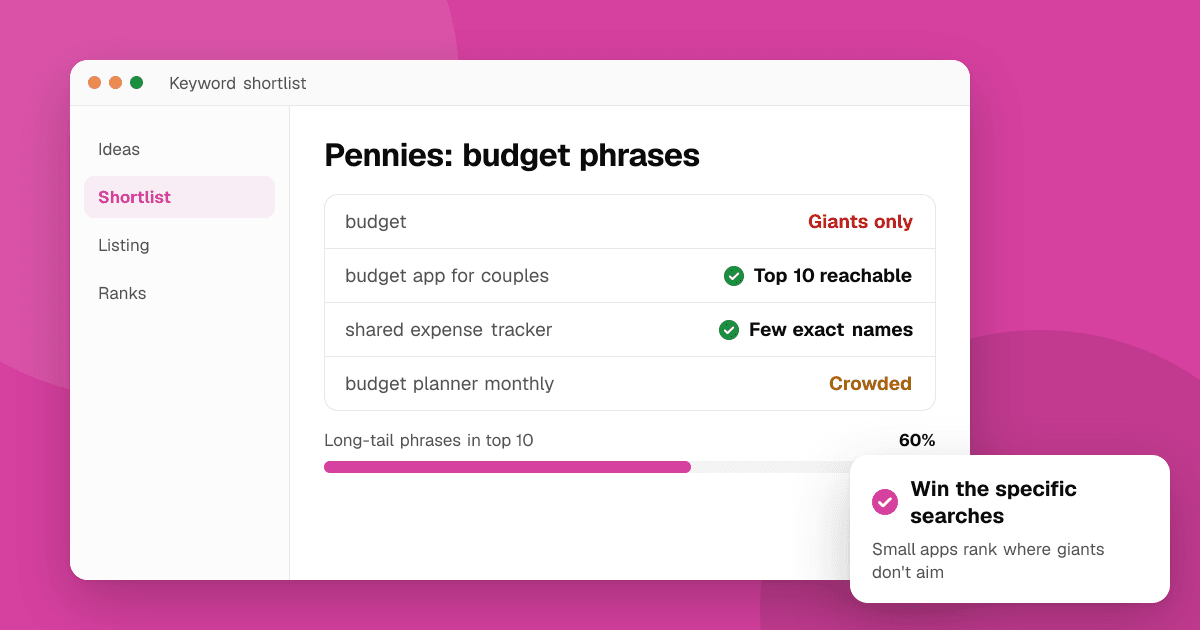
Short answer: long-tail keywords are longer, more specific search phrases, like "habit tracker for ADHD" instead of "habits". Each one is searched less, but the people searching it know exactly what they want and far fewer apps target it, so a new app can reach the top 10. Find them by expanding seed words with the stores' own autocomplete, check how crowded the results are, and build your title, subtitle and description around the ones that fit your app best.
What is a long-tail keyword?
Picture all the searches for apps in your space sorted by how often people type them. A few short phrases ("budget", "workout", "photo editor") get enormous volume. Behind them is a long tail of thousands of specific phrases that each get a little: "budget app for couples", "workout planner without equipment", "photo editor for film grain".
For a big, established app, the head is where the volume is. For a new or small app, the tail is where the winnable volume is.
Why do small apps win the long tail?
Both stores rank apps using text relevance first, then signals like downloads, engagement and conversion. On broad keywords, the established apps have years of those signals and you can't catch up quickly. Our guides on App Store ranking and Google Play ranking explain the details.
On a specific phrase, three things change in your favor:
- Fewer apps match it well. Big apps rarely put niche phrases in their names, so strong text relevance counts for more.
- Conversion is higher. Someone searching "sleep sounds for babies" who sees a sleep-sounds-for-babies app is very likely to download it, and that response is itself a ranking signal.
- The users are better fits. People who find you through a precise search are more likely to keep the app, which helps retention and, over time, your broader rankings too.
Many apps grow by winning a cluster of long-tail phrases first, then gradually climbing for the broader terms that share their words.
How do I find long-tail keywords for my app?
The best source is the store's own search box, because autocomplete only suggests phrases people actually search.
- Start with two or three seed words that describe your app: its core job ("budget"), its audience ("couples") and its key feature ("shared").
- Type each seed into the store's search and note the suggestions. Then try the seed followed by each letter of the alphabet ("budget a", "budget b"…) to surface dozens more. The free keyword suggestion tool does this for Google Play and the App Store in 52 countries, including an A to Z expansion, so you don't have to type it all by hand.
- Add phrases from real users. Support emails, reviews and community posts describe problems in the words people search with.
- Look at what close competitors call themselves. The competitor keyword finder pulls likely phrases from a rival's listing and shows where it ranks for each. More on that in how to find competitor keywords.
You'll end up with a long list. That's good; the next step cuts it down.
What do long-tail keywords look like in practice?
A few patterns produce most good long-tail phrases. Here are examples for fictional apps:
- Core job plus audience: "budget app for couples", "workout plan for beginners", "flashcards for medical students".
- Core job plus a constraint: "habit tracker without subscription", "offline maps for hiking", "white noise no ads".
- Core job plus a feature: "expense tracker with receipt scan", "meditation timer with bells".
- A specific problem: "split rent with roommates", "remember to drink water", "learn guitar chords fast".
Each describes one app's purpose more precisely than its broad category word, which is exactly why a focused app can match it better than a general one.
How do I tell if a long-tail keyword is worth it?
Check each candidate on two things: whether people search it, and whether you can rank for it.
- Popularity. A phrase the store suggests after only a few typed letters is usually searched more than one it only suggests when typed in full. Our guide on search popularity explains how to read that.
- Difficulty. Look at the top 10 results. If most of them put the exact phrase in their name, it's crowded. If the results only loosely match, few apps target it directly.
The keyword difficulty checker scores both from live store data: difficulty from how many top-10 apps use the phrase in their names, and popularity from how early autocomplete offers it. It never uses store ratings or download counts. Aim for phrases that are popular enough to appear in autocomplete but not dominated by exact-match names. See keyword difficulty explained for how to read the scores.
Finally, ask the honest question: does my app really do this? Ranking for a phrase your app doesn't serve brings downloads that uninstall quickly, which hurts more than it helps.
Where should long-tail keywords go in my listing?
Place your best phrase where each store weighs text most, and spread the rest across the other fields:
App Store
- App name: your brand plus your main phrase, if it reads naturally ("Pennies: Budget for Couples").
- Subtitle: a second phrase, written as a benefit.
- Keyword field: the remaining single words that complete other long-tail phrases. Apple combines words across these three fields. Our keyword field guide and the iOS keyword field optimizer help you fit them in.
Google Play
- Title and short description: your main phrase and one or two supporting phrases.
- Full description: use the other long-tail phrases naturally, each where it fits, a few times across the text. The keyword density checker shows whether you've repeated anything too much. See keyword density for Google Play descriptions.
Check lengths against each store's limits with the character counter.
How do I know it's working?
After your update goes live, check your position for each target phrase with the app rank checker. It searches live as a signed-out visitor in the country you choose: about the top 30 on Google Play, and on the App Store the exact first screen plus estimated positions up to 200. Record the results with the date, then recheck every week or two.
Expect long-tail phrases to move first. If you reach the top 10 for several, look for the broader phrases that share their words; that's often your next target. Our guide on tracking keyword rankings shows a simple routine.
Next steps
Pick one seed word, expand it with the keyword suggestion tool, and shortlist ten phrases your app genuinely serves. Score them with the keyword difficulty checker, rewrite your title and subtitle or short description around the best two, and record your starting positions. For the full research method, read how to research App Store and Google Play keywords.
Frequently asked questions
What is a long-tail keyword in ASO?
A longer, more specific search phrase such as "budget app for couples" rather than "budget". Each is searched less, but fewer apps target it and the people searching it are a better fit, so new apps can rank for it.
How do I find low-competition keywords for my app?
Expand seed words with the store's autocomplete (including the A to Z method), then check the top 10 results for each phrase. Phrases where few top apps use the exact words in their names are lower competition.
Are long-tail keywords worth it if few people search them?
Usually yes for a new app. Ranking in the top 10 for several specific phrases brings steady, well-matched installs, while ranking on page five for a broad keyword brings almost none.
Should my app name contain a long-tail keyword?
If it reads naturally, yes. The app name is the strongest text signal on both stores. Keep your brand visible and avoid stuffing several phrases into the name.