App Store search volume: how to estimate keyword popularity for free
Why Google Play and the App Store don't publish keyword search volume, where popularity scores come from, and how to estimate how often a phrase is searched for free.
· 6 min de leitura
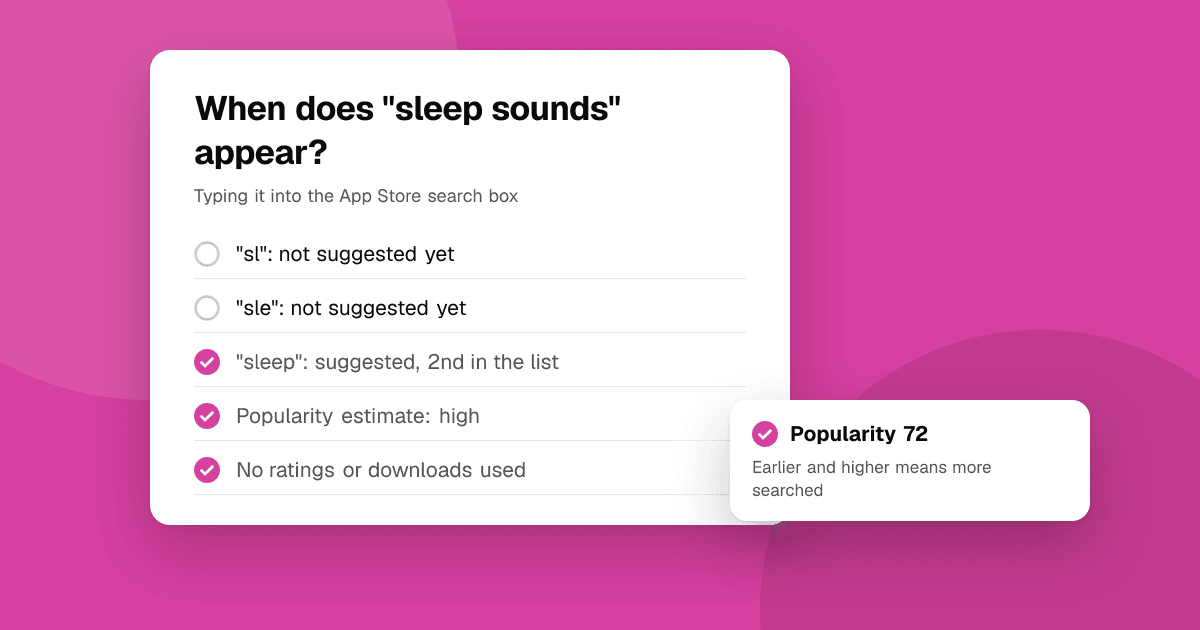
Short answer: neither Google Play nor the App Store publishes how many people search a phrase. Every "search volume" you see in an ASO tool is an estimate. The free, honest signals are the stores' own: Apple shows a popularity indicator to Apple Search Ads advertisers, and both stores' autocomplete only suggests phrases that are searched often, earlier and higher for more popular ones. Our free keyword difficulty checker turns autocomplete into a 0 to 100 popularity estimate for any phrase, in 52 countries.
Why don't the stores publish keyword search volume?
Google publishes search volumes for web search through its ads tools, but there is no equivalent for Google Play search. Apple doesn't publish App Store search counts either. Both stores treat search data as their own, and exact numbers would make their search easier to game.
What you do get is your own data:
- App Store Connect shows impressions and downloads from App Store search for your app.
- Play Console shows store listing visitors and acquisitions by traffic source, including search, and some of the search terms that brought people in.
That tells you how phrases perform for you, but not how popular a phrase is before you rank for it.
What is the Apple Search Ads popularity score?
Advertisers in Apple Search Ads can see a popularity indicator for search terms when they set up keyword campaigns. Apple describes it as a relative measure of how often a term is searched, not a count. The details of how it's calculated aren't public, and the scale and availability can change, so treat any number from it as relative: useful for comparing two phrases, not for predicting installs.
Many paid ASO tools base their volume estimates on this indicator plus their own models. That's why two tools can show very different numbers for the same phrase.
How does autocomplete show popularity?
When you type in a store's search box, the suggestions come from what people search. Two patterns are worth knowing:
- The fewer letters you need, the more popular the phrase. If "meditation" appears after typing "me", it's searched a lot. A phrase that only appears when you've typed most of it is searched less.
- Higher in the list usually means more popular. Among suggestions for the same letters, the ones at the top tend to be searched more.
A phrase that never appears as a suggestion, even when typed in full, is rarely searched. That alone is valuable: it stops you spending your 30-character title on a phrase nobody types.
How does the TrueLaunch popularity score work?
The keyword difficulty checker measures exactly those two patterns, live, as a signed-out visitor in the store and country you choose:
- It types short prefixes of the phrase into the store's autocomplete, shortest first: the first two letters, then three, five, eight and so on.
- It stops at the shortest prefix where the store suggests the whole phrase, and notes the phrase's place in that list.
- A phrase suggested after two letters at the top of the list scores 100. Needing more letters, or a lower place, lowers the score. A phrase suggested only when typed in full scores low, and one never suggested scores 5.
The checker shows what it found ("suggested after typing 'hab', 3rd in the list"), so you can see the evidence, not just the number. Answers are cached for a few hours, and the tool never uses ratings, reviews or downloads.
It's an estimate with known limits:
- Short phrases have an advantage. A two-word phrase can't be suggested much earlier than its first few letters, so compare phrases of similar length.
- Brand names dominate early letters. A popular app name can push your category phrase down the list for short prefixes.
- It's relative, not a count. It ranks phrases against each other; it doesn't say how many installs a phrase brings.
How should I use popularity when choosing keywords?
Never alone. A popular phrase full of strong competitors may be out of reach, and an easy phrase nobody searches is useless. The same checker shows a difficulty score from the current top 10; App Store keyword difficulty explained covers how to read the two together. In short:
- High popularity, low or medium difficulty: target it prominently.
- High popularity, high difficulty: use it where it costs little, like your keyword field or description, and build toward it.
- Low popularity, low difficulty: good long-tail support if it describes your app exactly. See long-tail keywords for apps.
Where do I find phrases to measure?
Start with the store's own suggestions. The keyword suggestion tool lists them for any seed word and runs the A to Z expansion for you. Then add the phrases your competitors target: the competitor keyword finder pulls up to 8 from any listing and shows where it ranks. Our guide to finding app keywords with autocomplete goes step by step.
Are there seasonal keywords?
Yes. Phrases like "tax calculator", "Christmas countdown" or "workout plan" rise and fall through the year, and autocomplete reflects that within days. A phrase that scores low in June may score high in December. If your app has a season, measure its phrases a few weeks before the peak, update your listing in time for the store to index it, and switch back afterwards.
Does popularity differ by country?
A lot. The same English phrase can be popular in the United States and rare in India or the United Kingdom, and in other languages people may search a completely different phrase. Measure each phrase in every country you target, in the local language. The app localization guide explains how to adapt the rest of the listing.
How do I check if a popular keyword actually brings installs?
After you add a phrase to your listing, watch three things for a few weeks:
- Your position for the phrase, with the app rank checker.
- Search impressions in App Store Connect or store listing visitors from search in Play Console.
- Conversion: installs per visitor from search. A popular phrase that brings visitors who don't install is a mismatch.
Rankings move slowly; give a change at least a couple of weeks before judging. Our rank tracking guide shows a simple way to log it.
Next steps
List ten phrases for your app and run each through the keyword difficulty checker to see popularity and difficulty side by side. Keep the ones that are searched and winnable, place them using our keyword research guide, and track your position with the app rank checker. Every tool is free at /tools.
Frequently asked questions
Can I see exact search volume for App Store keywords?
No. Apple doesn't publish search counts. Apple Search Ads shows advertisers a relative popularity indicator, and ASO tools estimate volume from it and other signals. Treat every volume number as an estimate.
Does Google Play show keyword search volume?
No. Google's web keyword tools don't cover Play Store search. Play Console shows search terms that brought visitors to your own listing, but not overall popularity.
How does autocomplete estimate keyword popularity?
Stores suggest phrases people search often. A phrase suggested after fewer typed letters and higher in the list is usually searched more; one never suggested is searched rarely.
What does a popularity score of 5 mean in the TrueLaunch checker?
The store didn't suggest the phrase at any prefix, even typed in full. It's likely rarely searched in that store and country.
Why do ASO tools disagree on search volume?
There's no official number to copy, so each tool builds its own estimate from different data and models. Compare phrases within one tool rather than numbers across tools.